SQL#
DoltHub provides an API for accessing Dolt databases via web requests. A Dolt database can be attached to a DoltHub remote and pushed. At that point DoltHub provides an API against which users can execute Dolt SQL with results returned as JSON.
Note: Please make sure to send your requests to
https://www.dolthub.cominstead ofhttps://dolthub.com.
Reading#
Using the default branch#
/{owner}/{database}
SQL read queries on the default branch
https://www.dolthub.com/api/v1alpha1/{owner}/{database}Parameters
| Name | In | Type | Required | Description |
|---|---|---|---|---|
owner | path | string | Yes | The name of the database owner. Example: dolthub |
database | path | string | Yes | The name of the database. Example: ip-to-country |
q | query | string | No | The SQL query to execute. Example: SHOW TABLES |
Responses
Body — application/json
{
  "query_execution_status": "Success",
  "query_execution_message": "",
  "repository_owner": "dolthub",
  "repository_name": "ip-to-country",
  "commit_ref": "main",
  "sql_query:": "SHOW TABLES",
  "schema": [
    {
      "columnName": "Tables_in_dolt",
      "columnType": "longtext"
    }
  ],
  "rows": [
    {
      "[columnName]": "IPv4ToCountry"
    }
  ]
}| Field | Type | Description |
|---|---|---|
query_execution_status | string | Query execution status |
query_execution_message | string | Additional information about the query execution |
repository_owner | string | Owner of the database |
repository_name | string | Database name |
commit_ref | string | Commit ref that the query is executed against |
sql_query: | string | SQL query that was executed. |
schema | array<object> | Schema of the SQL table |
rows | array<object> | Rows returned by the query |
Body — application/json
{
  "query_execution_status": "Error",
  "query_execution_message": "query error: Error parsing SQL",
  "repository_owner": "dolthub",
  "repository_name": "ip-to-country",
  "commit_ref": "main",
  "sql_query:": "invalid query"
}| Field | Type | Description |
|---|---|---|
query_execution_status | string | |
query_execution_message | string | |
repository_owner | string | |
repository_name | string | |
commit_ref | string | |
sql_query: | string |
We will use an example DoltHub database, dolthub/ip-to-country and the Python requests library to explore it in the Python console:
import requests

owner, database = 'dolthub', 'ip-to-country'
res = requests.get('https://dolthub.com/api/v1alpha1/{}/{}'.format(owner, database))
res.json()
This shows our database metadata as a dictionary:
{'query_execution_status': 'Success',
 'query_execution_message': '',
 'repository_owner': 'dolthub',
 'repository_name': 'ip-to-country',
 'commit_ref': 'main',
 'sql_query': 'SHOW TABLES;',
 'schema': [{'columnName': 'Table',
   'columnType': 'longtext'}],
 'rows': [{'Table': 'IPv4ToCountry'}, {'Table': 'IPv6ToCountry'}]}
Specifying a ref#
/{owner}/{database}/{ref}
SQL read queries on a specified ref
https://www.dolthub.com/api/v1alpha1/{owner}/{database}/{ref}Parameters
| Name | In | Type | Required | Description |
|---|---|---|---|---|
owner | path | string | Yes | The name of the database owner. Example: dolthub |
database | path | string | Yes | The name of the database. Example: ip-to-country |
ref | path | string | Yes | The database ref to execute the query against. Example: newbranch |
q | query | string | No | The SQL query to execute. Example: SELECT * FROM IPv4ToCountry WHERE CountryCode2Letter = 'AU' |
Responses
Body — application/json
{
  "query_execution_status": "Success",
  "query_execution_message": "",
  "repository_owner": "dolthub",
  "repository_name": "ip-to-country",
  "commit_ref": "newbranch",
  "sql_query:": "SELECT * FROM IPv4ToCountry WHERE CountryCode2Letter = 'AU'",
  "schema": [
    {
      "columnName": "IPFrom",
      "columnType": "Int"
    }
  ],
  "rows": [
    {
      "[columnName]": "16777216"
    }
  ]
}| Field | Type | Description |
|---|---|---|
query_execution_status | string | Query execution status |
query_execution_message | string | Additional information about the query execution |
repository_owner | string | Owner of the database |
repository_name | string | Database name |
commit_ref | string | Commit ref that the query is executed against |
sql_query: | string | SQL query that was executed. |
schema | array<object> | Schema of the SQL table |
rows | array<object> | Rows returned by the query |
Body — application/json
{
  "query_execution_status": "Error",
  "query_execution_message": "query error: Error parsing SQL",
  "repository_owner": "dolthub",
  "repository_name": "ip-to-country",
  "commit_ref": "newbranch",
  "sql_query:": "invalid query"
}| Field | Type | Description |
|---|---|---|
query_execution_status | string | |
query_execution_message | string | |
repository_owner | string | |
repository_name | string | |
commit_ref | string | |
sql_query: | string |
We can now execute a query:
query = '''SELECT * FROM IPv4ToCountry WHERE CountryCode2Letter = "AU"'''
res = requests.get(
  'https://www.dolthub.com/api/v1alpha1/{}/{}/{}'.format(owner, database, branch),
  params={'q': query},
  )
res.json()
This yields the results as JSON, with both schema and data:
{'query_execution_status': 'RowLimit',
 'query_execution_message': '',
 'repository_owner': 'dolthub',
 'repository_name': 'ip-to-country',
 'commit_ref': 'main',
 'sql_query': 'SELECT * FROM IPv4ToCountry WHERE CountryCode2Letter = "AU"',
 'schema': [{'columnName': 'IPFrom',
   'columnType': 'Int'},
  {'columnName': 'IpTo', 'columnType': 'Int'},
  {'columnName': 'Registry', 'columnType': 'String'},
  {'columnName': 'AssignedDate', 'columnType': 'Int'},
  {'columnName': 'CountryCode2Letter',
   'columnType': 'String'},
  {'columnName': 'CountryCode3Letter',
   'columnType': 'String'},
  {'columnName': 'Country', 'columnType': 'String'}],
 'rows': [{'IPFrom': '16777216',
   'IpTo': '16777471',
   'Registry': 'apnic',
   'AssignedDate': '1313020800',
   'CountryCode2Letter': 'AU',
   'CountryCode3Letter': 'AUS',
   'Country': 'Australia'},
.
.
.
]}
As a reminder, this API is in Alpha version, and we will continue to flesh this out, as well as improve query performance, over time.
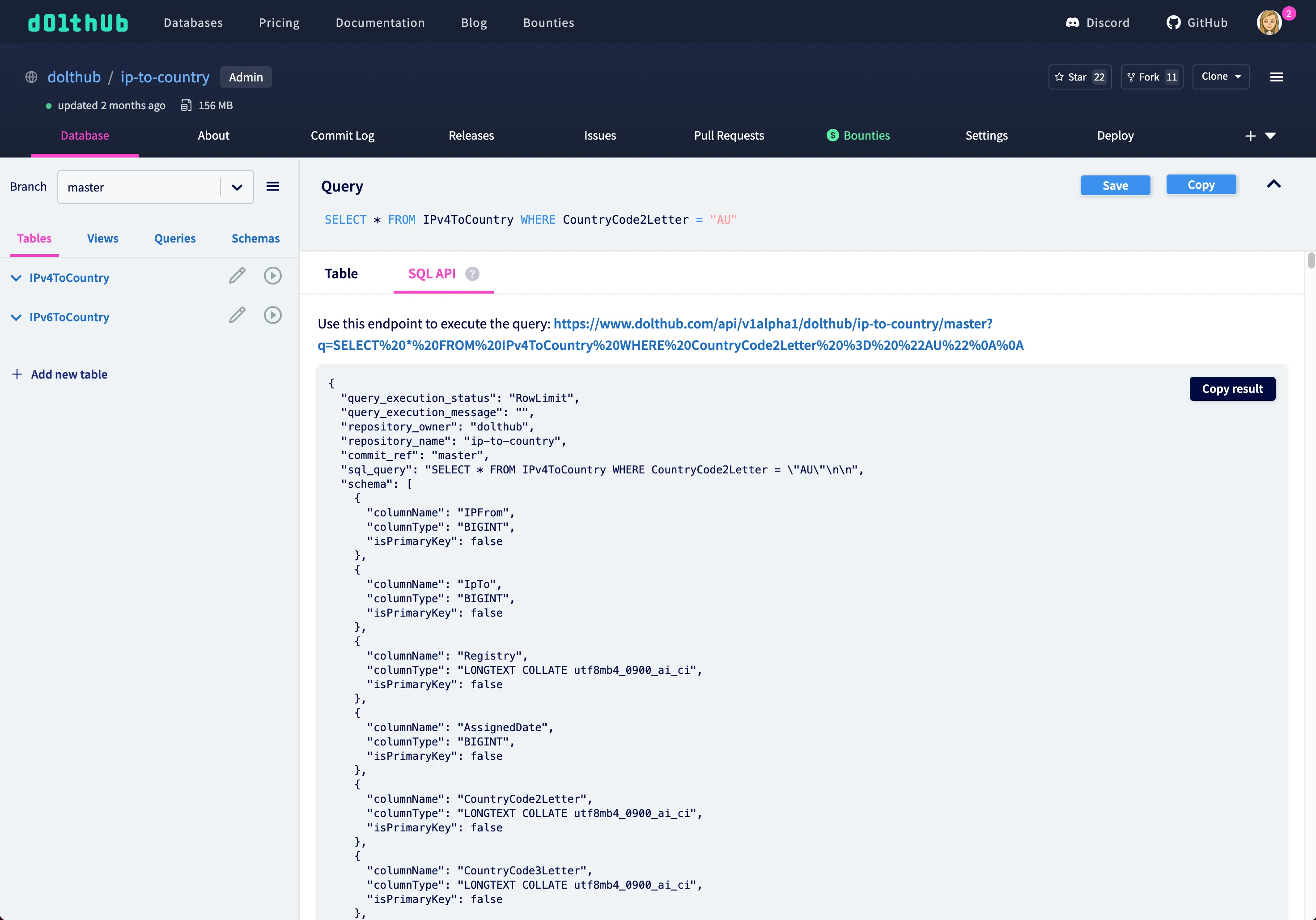
You can also explore our SQL API on DoltHub whenever you execute a query:
Writing#
Since adding, updating, and deleting data can take a bit of time to execute against larger databases, we made the writable API asynchronous. Therefore we needed to add two HTTP endpoints for executing these kinds of queries using the SQL API.
We can use our SHAQ database as an example. These are the steps we’d take to update a player’s id in the player stats table.
1. Run query#
/{owner}/{database}/write/{from_branch}/{to_branch}
SQL write query and merge branches
Executes SQL write against to_branch (will be created from from_branch if it doesn't exist). If no query is provided, will merge to_branch into from_branch.
https://www.dolthub.com/api/v1alpha1/{owner}/{database}/write/{from_branch}/{to_branch}Parameters
| Name | In | Type | Required | Description |
|---|---|---|---|---|
owner | path | string | Yes | The name of the database owner. Example: dolthub |
database | path | string | Yes | The name of the database. Example: SHAQ |
from_branch | path | string | Yes | The base branch. Example: main |
to_branch | path | string | Yes | The branch to write to. Will be created from the from_branch if it doesn't exist. Example: feature |
q | query | string | No | The SQL query to execute. Use the request body instead for larger queries. Example: UPDATE player_season_stat_totals SET player_id=714287 WHERE player_id=15404617 |
Request Body
Content-Type: application/json
| Field | Type | Required | Description |
|---|---|---|---|
query | string | No | SQL write query to execute. Can be used in place of the query parameter for larger queries. |
Responses
Body — application/json
{
  "query_execution_status": "Success",
  "query_execution_message": "Operation created. Poll the operation endpoint to see the execution status of this query.",
  "repository_owner": "dolthub",
  "repository_name": "SHAQ",
  "from_branch_name": "main",
  "to_branch_name": "main",
  "query:": "UPDATE player_season_stat_totals SET player_id=714287 WHERE player_id=15404617",
  "operation_name:": "operations/72abb56b-d478-43ae-9a2d-c9602184c7ab"
}| Field | Type | Description |
|---|---|---|
query_execution_status | string | Query execution status |
query_execution_message | string | Additional information about the query execution |
repository_owner | string | Owner of the database |
repository_name | string | Database name |
from_branch_name | string | Base branch |
to_branch_name | string | Branch the query is executed on |
query: | string | SQL query that was executed. |
operation_name: | string | Operation name that can be used to poll for the query result. |
Body — application/json
{
  "query_execution_status": "Error",
  "query_execution_message": "query error: Error parsing SQL",
  "repository_owner": "dolthub",
  "repository_name": "SHAQ",
  "from_branch_name": "main",
  "to_branch_name": "main",
  "query:": "UPDATE player_season_stat_totals SET player_id=714287 WHERE player_id=15404617",
  "operation_name:": ""
}| Field | Type | Description |
|---|---|---|
query_execution_status | string | |
query_execution_message | string | |
repository_owner | string | |
repository_name | string | |
from_branch_name | string | Base branch |
to_branch_name | string | Branch the query is executed on |
query: | string | SQL query that was executed. |
operation_name: | string | Operation name that can be used to poll for the query result. |
First, we want to hit the write endpoint with our UPDATE query. This will start an asynchronous operation.
owner, database, from_branch, to_branch = 'dolthub', 'SHAQ', 'main', 'update-player'
query = '''UPDATE player_season_stat_totals SET player_id=714287 WHERE player_id=15404617'''
headers = {
    'authorization': 'token [see Authentication section for token]'
}

write_res = requests.post(
        f'https://www.dolthub.com/api/v1alpha1/{owner}/{database}/write/{from_branch}/{to_branch}',
        params={'q': query},
        headers=headers,
    )
write_json = write_res.json()
Note: for larger queries you can put the query in the request body (
json={"query": [your query]}) instead of using the query parameter.
The main branch already exists in the database, and providing a <to_branch> that doesn’t exist will create this new branch from the <from_branch>.
The yielded JSON results include an operation_name.
{
  "query_execution_status": "Success",
  "query_execution_message": "Operation created. Poll the operation endpoint to see the execution status of this query.",
  "repository_owner": "dolthub",
  "repository_name": "SHAQ",
  "to_branch_name": "update-player",
  "from_branch_name": "main",
  "query": "UPDATE player_season_stat_totals SET player_id=714287 WHERE player_id=15404617",
  "operation_name": "operations/72abb56b-d478-43ae-9a2d-c9602184c7ab"
}
2. Poll operation#
/{owner}/{database}/write
Check write query operation status
Poll the operation to check if the SQL write operation is done
https://www.dolthub.com/api/v1alpha1/{owner}/{database}/writeParameters
| Name | In | Type | Required | Description |
|---|---|---|---|---|
owner | path | string | Yes | The name of the database owner. Example: dolthub |
database | path | string | Yes | The name of the database. Example: SHAQ |
operationName | query | string | Yes | The name of the operation Example: operations/72abb56b-d478-43ae-9a2d-c9602184c7ab |
Responses
Body — application/json
{
  "_id": "operations/72abb56b-d478-43ae-9a2d-c9602184c7ab",
  "done": true,
  "res_details": {
    "query_execution_status": "Success",
    "query_execution_message": "Query OK, 2 rows affected. Rows matched: 2  Changed: 2  Warnings: 0.",
    "owner_name": "dolthub",
    "repository_name": "SHAQ",
    "from_commit_id": "518ue176ec13qf563e87uoerkqqepood",
    "to_commit_id": "5sp7i0bov6itma2u04dpk15ui24lrigp"
  }
}| Field | Type | Description |
|---|---|---|
_id | string | The operation name |
done | boolean | Whether or not the operation has completed |
res_details | object | Additional information about the completed SQL write operation |
Body — application/json
{
  "query_execution_status": "Error",
  "query_execution_message": "query error: Error parsing SQL",
  "operation_name": "operations/72abb56b-d478-43ae-9a2d-c9602184c7ab"
}| Field | Type | Description |
|---|---|---|
query_execution_status | string | |
query_execution_message | string | |
operation_name | string |
operation_name can be used to poll the second endpoint to check if the operation is done.
def get_operation(op_name):
  op_res = requests.get(
      f'https://www.dolthub.com/api/v1alpha1/{owner}/{database}/write',
      params={'operationName': op_name},
      headers=headers,
  )
  return op_res.json()


def poll_operation(op_name):
    done = False
    while done == False:
        poll_res = get_operation(op_name)
        done = poll_res['done']
        if done:
            return poll_res
        else:
            time.sleep(3)


res = poll_operation(write_json['operation_name'])
A done operation will yield a response that includes some query metadata, including from and to commit ids.
{
  "_id": "operations/72abb56b-d478-43ae-9a2d-c9602184c7ab",
  "done": true,
  "res_details": {
    "query_execution_status": "Success",
    "query_execution_message": "Query OK, 2 rows affected. Rows matched: 2  Changed: 2  Warnings: 0.",
    "owner_name": "tbantle",
    "repository_name": "SHAQ",
    "from_commit_id": "518ue176ec13qf563e87uoerkqqepood",
    "to_commit_id": "5sp7i0bov6itma2u04dpk15ui24lrigp"
  }
}
3. View changes#
Since a lot of Dolt’s functionality is exposed via SQL, we can use the commit ids to query the dolt_commit_diff_$tablename table to view the resulting diff from our UPDATE query.
from_commit, to_commit = res['res_details']['from_commit_id'], res['res_details']['to_commit_id']
query = f'''SELECT from_player_id, to_player_id, diff_type FROM `dolt_commit_diff_player_season_stat_totals` WHERE from_commit="{from_commit}" AND to_commit="{to_commit}"'''

diff_res = requests.get(
    f'https://www.dolthub.com/api/v1alpha1/{owner}/{database}/{to_branch}',
    params={'q': query},
    headers=headers,
)
diff_res.json()
We can repeat this process with as many queries as we want. Every query will create a commit on the <from_branch>.
4. Merge changes#
Once we’re satisfied with our changes, we can merge our branches by hitting the first endpoint with an empty query.
merge_res = requests.post(
        f'https://www.dolthub.com/api/v1alpha1/{owner}/{database}/write/{to_branch}/{from_branch}',
        params=None,
        headers=headers,
    )

merge_json = merge_res.json()
poll_operation(merge_json['operation_name'])
You can learn more about using the writable SQL API here.