

DoltHub is the version-control database company. When we started, the idea of “Git for Data” essentially meant the ability to share data in a distributed workflow. In other words, pushing data to a remote repository where others could clone it and work with it. The ability to clone, push, and pull data is table stakes for anything that claims it’s “like Git.”
DumboDB is DoltHub’s implementation of a document database that is compatible with MongoDB. It’s like MongoDB and Git had a baby. Until today, all DumboDB data was trapped on your local server instance. The ability to push to a remote repository and tell your friend to clone it and play with your data didn’t exist. Until now!
Today, we’re happy to announce Phase 1 of our distributed data workflow, which includes the ability to clone, push, and pull data in DumboDB. There are some caveats and limitations we’ll cover, but the basics are there. Let’s dig in!
Roadmap#
Before jumping in, I want to outline the plan for this space, and where we are now. We have three phases:
- Phase 1: You can push from a DumboDB server or fetch into one. This is where we are now. Done!
- Phase 2: Support pushing into a DumboDB server directly from an external entity.
- Phase 3: DoltHub will be a first-class citizen in the DumboDB ecosystem.
Today, you are unblocked from moving your data between different DumboDB instances. Phase 2 and 3 will improve the experience further.
Remote Transport Types, and Dolt#
In Dolt, our MySQL-compatible version-controlled database, we have supported clone, push, and pull operations since day 1. Furthermore, we’ve added support for various remote transport types, allowing users to interact with repositories over several protocols.
These protocols include https (DoltHub), git (GitHub), s3 (AWS, R2, MinIO), file (local filesystem), and others, all documented here. The operations are exactly what you would expect from a Git-like workflow: clone, push, fetch, and pull.
DumboDB is intentionally built on top of Dolt’s storage engine, largely because we want to leverage the same distributed data workflow capabilities that Dolt has. Dolt’s storage engine is built on content-addressed binary blobs called chunks that form a Merkle DAG, and it enables DumboDB to use the same system with virtually no changes at all.
That said, we’ve decided not to support ssh yet because it has some Dolt-specific characteristics that we haven’t yet adapted for DumboDB. Let us know if you’d like us to support it!
Kicking the Tires#
Probably the best way to show you how this works is to walk through an example.
We’ll use a file:// endpoint because it’s the simplest way to demonstrate the functionality without needing any external services. And we’ll start by pushing out of your DumboDB instance because we need something to clone. We’ll demonstrate pushing to DoltHub below.
Setup#
First, make sure you have a DumboDB instance running. You’ll need release 0.6.2, which is the latest.
In a terminal, run the DumboDB server:
$ dumbodb --data-dir /tmp/dumbodbThat will start a standard DumboDB server instance. Leave it running while you connect to it in another terminal, using the mongosh client:
$ mongosh mongodb://localhost
[...snip...]
test>
Now, let’s just create a single document and commit it so that you’ll have something to push and pull in subsequent steps.
test> use pushdb
pushdb> db.items.insertOne({ _id: 1, label: "alpha" })
{ acknowledged: true, insertedId: 1 }
pushdb> db.runCommand({ dumboCommit: 1, message: "Data!"})
{
  commitId: '4v2tpumurj5qaqaa0caok8tom39daibe',
  branch: 'main',
  message: 'Data!',
  author: 'dumbodb <dumbodb@dumbodb>',
  timestamp: ISODate('2026-08-31T21:05:33.887Z'),
  committer: 'dumbodb <dumbodb@dumbodb>',
  committerTimestamp: ISODate('2026-08-31T21:05:33.887Z'),
  ok: 1
}
Create a File Remote#
Git uses the git remote command to manage remote endpoint configuration, and the equivalent in DumboDB is the dumboRemote command. To create a new remote, you can use the following command:
db.runCommand(
  { dumboRemote: 1,
    action: "add",
    name: "origin",
    url: "file:///tmp/dumbo-remote"
  })
This will create a new remote named “origin” pointing to the file-based remote at /tmp/dumbo-remote. If that isn’t an appropriate location for your remote, you can change it to suit your needs.
If you want to list your configured remotes, you can use the command with the list action:
pushdb> db.runCommand({ dumboRemote: 1, action: "list"})
{
  remotes: [ { name: 'origin', url: 'file:///tmp/dumbo-remote' } ],
  ok: 1
}
Push to the Remote#
The newly introduced dumboPush command is used to push your changes out of your DumboDB instance to the configured remote.
pushdb> db.runCommand({ dumboPush: 1, to: "origin", refSpec: "main" })
{
  remote: 'origin',
  branch: 'main',
  commitPushed: '4v2tpumurj5qaqaa0caok8tom39daibe',
  upToDate: false,
  ok: 1
}
One thing that shows here is that we are following Git’s example of using a refSpec to specify the reference (e.g., branch) to push. Using the string “main” means that we will push the local main branch to the main branch on the remote.
Also worth noting is that the response includes the commit ID that was pushed. If this was an existing branch, there would be an additional field in the response called commitBefore, which would be the commit ID of the tip of the branch before you pushed. In this particular case, the remote database is empty, so there was no branch to update. Thus, the commitBefore field is not present in the response.
If you want to be sure your changes are in the file remote, take a look!
ls -1 /tmp/dumbo-remote
2vhmonp6lhvg1vf8teh60466vs2r00g0
LOCK
m263a9ek3suakc0njpenp3q4eo54hagv.darc
manifest
oldgen
Those files look like a Dolt database!
Clone from the Remote#
Now that you’ve moved your changes out of your server and into your file:// remote, we can clone it!
One thing to call out is that a DumboDB server can have multiple databases, just like a Dolt server. This means that you can clone into the same server you’ve been working with, and it will create a new database within that server.
pushdb> use admin
admin> db.runCommand({
  dumboClone:1,
  from: "file:///tmp/dumbo-remote",
  as: "cloned_db"
})
{
  db: 'cloned_db',
  from: 'file:///tmp/dumbo-remote',
  defaultBranch: 'main',
  commit: '4v2tpumurj5qaqaa0caok8tom39daibe',
  branches: [ 'main' ],
  ok: 1
}
Now you can use that database and look at the one document we pushed earlier.
admin> use cloned_db
cloned_db>
cloned_db> db.items.find({})
[
  { _id: 1, label: 'alpha' },
]
Or you can see the commit that we created in the original database:
cloned_db> db.runCommand({dumboLog:1, limit: 1})
{
  commits: [
    {
      commitId: '4v2tpumurj5qaqaa0caok8tom39daibe',
      refs: [ 'HEAD', 'main' ],
      parent1: 'a77hn464e6ai2g59tfipktbreonou1sj',
      message: 'Data!',
      author: 'dumbodb <dumbodb@dumbodb>',
      timestamp: ISODate('2026-08-31T21:05:33.887Z'),
      committer: 'dumbodb <dumbodb@dumbodb>',
      committerTimestamp: ISODate('2026-08-31T21:05:33.887Z'),
    }
  ],
  next: [ 'a77hn464e6ai2g59tfipktbreonou1sj' ],
  ok: 1
}
We have also added the dumboFetch and dumboPull commands to facilitate fetching and pulling changes from remote databases. One thing we designed for is machine usage as the primary consumer of these interfaces, and one thing to point out is that dumboFetch gives full details of what gets updated. This allows agents to fetch changes and quickly know what changed.
There were changes pushed to the origin in our example, and fetching them all looks like this:
pushdb> db.runCommand({dumboFetch: 1, from: "origin" })
{
  remote: 'origin',
  branches: [
    { branch: 'branch1', commit: 'kt65df1inmf92p1mtuhs939hlh9oafse' },
    { branch: 'branch2', commit: 'a77hn464e6ai2g59tfipktbreonou1sj' },
    {
      branch: 'main',
      commitBefore: 'kt65df1inmf92p1mtuhs939hlh9oafse',
      commit: 'vmgthumg50u8oui1kebk9fhfetop1bhr'
    }
  ],
  ok: 1
}
What this is telling the caller is that main moved from commit kt65df1inmf92p1mtuhs939hlh9oafse to commit vmgthumg50u8oui1kebk9fhfetop1bhr, and branch1 and branch2 are newly created branches with commits kt65df1inmf92p1mtuhs939hlh9oafse and a77hn464e6ai2g59tfipktbreonou1sj, respectively. Having these details in hand allows the caller to quickly see the difference in the repository state.
dumboPull is honestly a nice-to-have, as it is simply a fetch then merge, similar to Git. I suspect machines are happier to fetch and then merge, but what do I know? Ask your agents, and let us know!
Push to DoltHub#
As stated above, you can push your changes over several different remote protocols. One of those protocols is https, which allows you to push your changes to a DoltHub repository. I also noted above that DoltHub doesn’t natively understand DumboDB yet, so you can’t use the website to run queries against it. It does, however, serve as a common endpoint you can clone from, push to, and pull from.
Dolt Login#
In order to push your changes to DoltHub, you first need to log in with your DoltHub credentials. This is done through the dolt command, which you will need to install (it’s not part of DumboDB).
Once installed, you can run the dolt login command, which will place a private key in your host and connect it to your DoltHub account.
$ dolt login
Credentials created successfully.
pub key: kllqvegfbfvon8nb9g91d058gksuev6f4le7c8k4su1opsd4b99g
/Users/neil/.dolt/creds/10t26td3r4itfv62bn504sflpjs4u8t9lucndca4mn92k.jwk
Attempting to automatically open the credentials page in your default browser.
If the browser does not open or you wish to use a different device to authorize this request, open the following URL:
	https://dolthub.com/settings/credentials#kllqvegfbfvon8nb9g91d058gksuev6f4le7c8k4su1opsd4b99g
Please associate your key with your account.
DumboDB will use that private local key when pushing changes to DoltHub.
Create a DoltHub Database#
To create your database, head here: https://www.dolthub.com/profile/new-repository.
Give your database a name and hit the “Create Database” button.
You will see some instructions about how to import data or use the dolt command to push data into the database. DON’T! You are going to push from your DumboDB server instead.
Push to DoltHub#
Using the dumboRemote command, you can add a remote to your new DoltHub database. For DoltHub databases, you don’t need to specify a fully qualified URL; you can just use the repository name, which for me is macneale/dumbo-demo:
cloned_db> use pushdb
pushdb> db.runCommand({
  dumboRemote: 1,
  action: "add",
  name: "dolthub",
  url: "macneale/dumbo-demo"})
{
  name: 'dolthub',
  url: 'https://doltremoteapi.dolthub.com/macneale/dumbo-demo',
  ok: 1
}
Then, use dumboPush to push your changes to the DoltHub remote:
pushdb> db.runCommand({dumboPush: 1, to: "dolthub", refSpec: "main"})
{
  remote: 'dolthub',
  branch: 'main',
  commitPushed: '4v2tpumurj5qaqaa0caok8tom39daibe',
  upToDate: false,
  ok: 1
}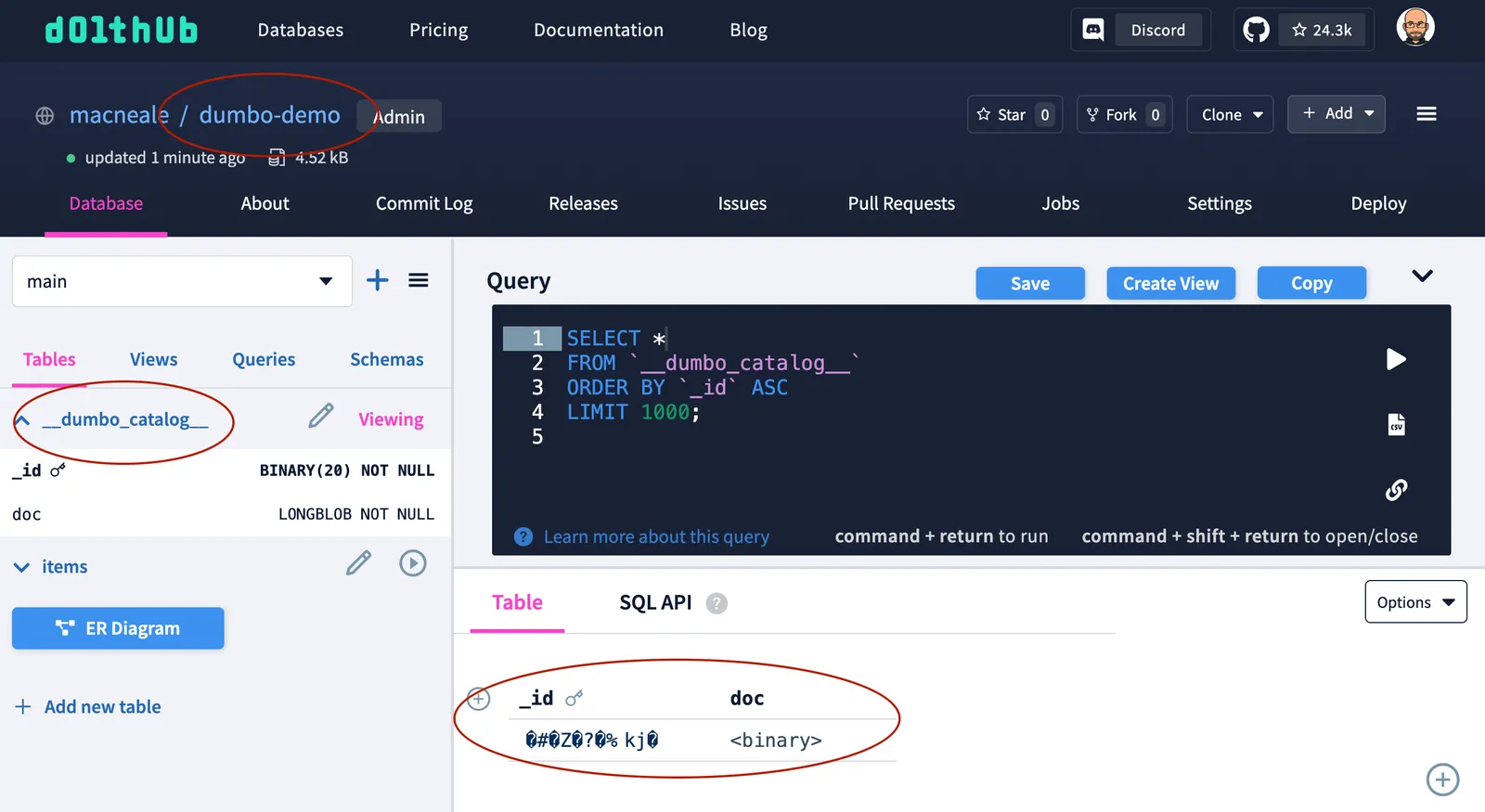
Three things to point out:
- That’s the
dumbo-demorepository I created on DoltHub. - You can see a special table… I mean, collection, called
__dumbo_catalog__, which is used in DumboDB to store configuration information for collections. - The data you can see is in the
_idanddoccolumns, which are binary data you can’t actually read.```
So while the user experience is not fully ironed out for DoltHub yet, you can still use it as a place to push data and let others clone it into their own DumboDB instances. Today, DoltHub serves as a storage location; tomorrow, it will be a full-fledged collaboration platform.
What’s Next?#
As hinted at above, Phase 2 of this work will enable you to push and pull data between DumboDB instances. This will include branch-level permissions that play nicely with our recent security enhancements. We are also overhauling the merge code in DumboDB to make it more robust.
What features would you like to see? Join us on Discord to share your thoughts or just nerd out about version-controlled databases!