
Here are two builds of the same tiny game, one database commit apart:
=== Battle report: 3 units in the roster (config hnak4bdfk10s) ===
Footman vs Archer: draw at 6 hits each

=== Battle report: 3 units in the roster (config lravfogrck8d) ===
Footman vs Archer: Footman wins in 5 hits
No source code changed between these builds. A designer ran one SQL
UPDATE, committed it, and a CI server was alerted to test and
ship a new binary with the commit hash stamped inside. The database is
Dolt, the world’s first version-controlled SQL
database. The CI server is
TeamCity, which as of this year can
treat a Dolt database as a first-class version control system.
It’s a collaborative sequel. Two years ago we wrote about how Scorewarrior manages their game configuration with Dolt: designers tune stats on branches, changes merge through pull requests, and shipping means cutting a tag and building binary artifacts. That post ended right where the config leaves Dolt and enters the build system. Now the engineer who ran that build system just fixed its one missing piece.
What Is TeamCity?#
TeamCity is JetBrains’ continuous integration (CI) server for developers and build engineers. If CI is new to you: it’s the practice of committing changes to a shared repository many times a day, with every commit followed by an automated build and test run, so integration problems surface in minutes instead of at release time. TeamCity is a veteran of the field, available on-premises or as a managed cloud service, and the free Professional license is generous: 100 build configurations, 3 build agents, no restrictions on users or runtime, and the full feature set for commercial, open-source, and personal projects alike.
The architecture has two primary components: the TeamCity server, which provides the web UI for managing configuration and results, and build agents, the workers that execute your builds. You configure everything through the UI, through the Kotlin DSL, or a hybrid of both, with UI changes committed back to your repository as code.
Notice the word “repository”. TeamCity is built around version control: it polls your VCS for commits, lists them in a Changes tab, triggers builds when they land, and pins every build to the revision that caused it. That raises our favorite kind of question: what if the thing under version control is a database?
TeamCity and Dolt, Before#
Yury Dynnikov, formerly of Scorewarrior and now at JetBrains, spent years building game configs from Dolt into binary packages with TeamCity. However, TeamCity did not understand Dolt’s version control: commits, branches, and tags were all invisible. Still, a pipeline could work with a separate replica server just to have something stable to build from, branch names passed around as build parameters instead of TeamCity’s native branch handling, and some other not-so-cool tricks.
Look, a Cool New Plugin!#
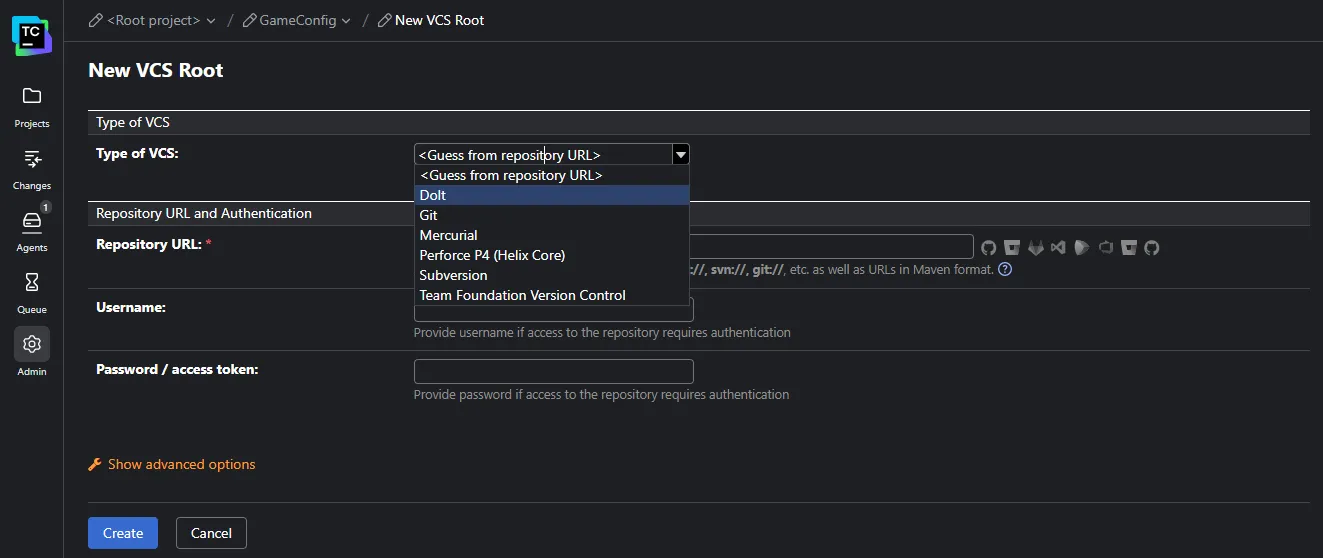
Yury’s fix is a Dolt plugin for TeamCity (source on GitHub, MIT licensed). He is clear it’s a personal project rather than a JetBrains product, but it does what his old pipeline always wanted: install it and “Dolt” appears in TeamCity’s Type of VCS dropdown, right next to Git, Subversion, and Perforce.
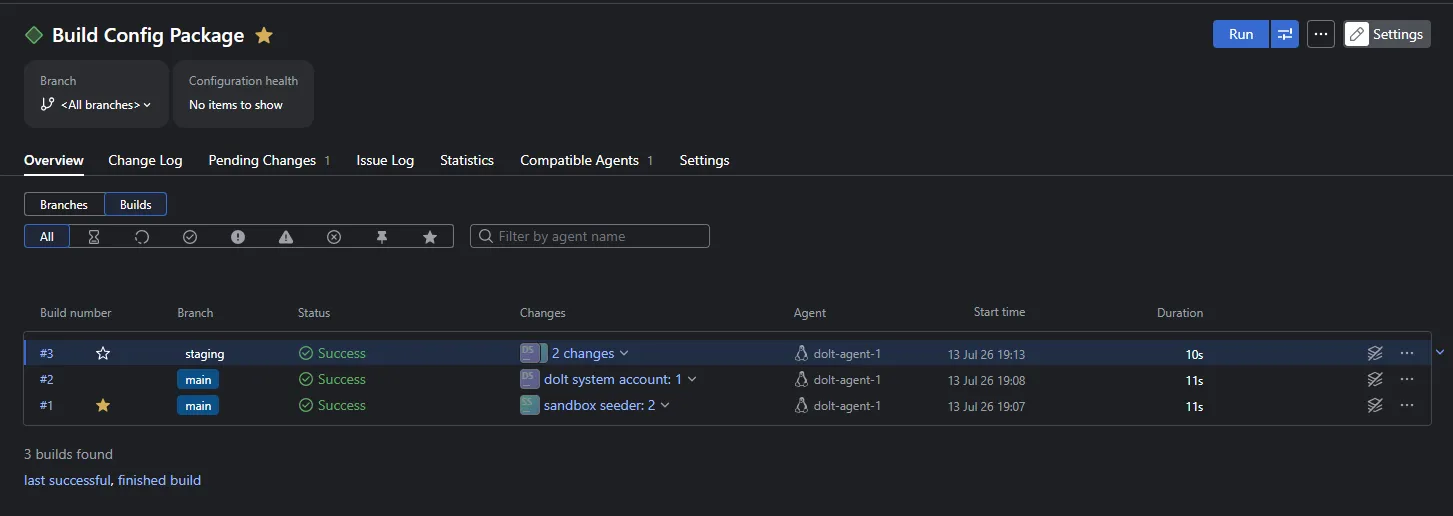
Commits show up in the Changes tab with hash, author, and message. Branch
specifications work, so a commit to staging builds apart from main,
each branch with its own build history:
There are two connection modes: Remote JDBC
points at a dolt sql-server you already run, while Local mode clones
from DoltHub or DoltLab
and manages its own SQL server, with private repos handled through an
Ed25519 keypair flow, the same
credential mechanism dolt login uses,
except TeamCity generates the keypair and you register its public half on
DoltHub.
Yury also runs a public demo server (guest login) where the plugin builds the Endless Sky game data through a real pipeline: export, data-quality tests, release bundles, all configured in Kotlin DSL.
The Query Behind the Changes Tab#
The plugin renders data changes and schema changes as different entries, and you can see how via a common Dolt SQL function:
SELECT * FROM DOLT_DIFF_SUMMARY('hnak4bdfk10s...', 'lravfogrck8d...');
+-----------------+---------------+-----------+-------------+---------------+
| from_table_name | to_table_name | diff_type | data_change | schema_change |
+-----------------+---------------+-----------+-------------+---------------+
| units           | units         | modified  | 1           | 0             |
+-----------------+---------------+-----------+-------------+---------------+
A data_change without schema_change makes the Changes tab show
tables/units. But run the same function against our branch that adds an
armor column and both flags flip on, so the tab renders
tables/units (schema) as its own entry.
Why bring this up? Risk. The Footman buff changes a
number the game already knows how to read, so CI can test it and ship it
to live servers right away. The armor column changes the shape of the
data, and every program that reads the config now has to be updated to
match, so that commit should get extra checks.
Since the plugin writes the two as different paths, TeamCity trigger rules can route each kind to the right build automatically.
Setup#
Installers are available for Linux, macOS, and Windows, but we used JetBrains’ own recommended Docker distribution. After all, this is an inherently multi-service system: the TeamCity server needs the TeamCity agent image to spawn build processes, plus a Dolt SQL server to be the repository. (New to Dolt in Docker? We have a getting started post.) Three containers, wired like this:
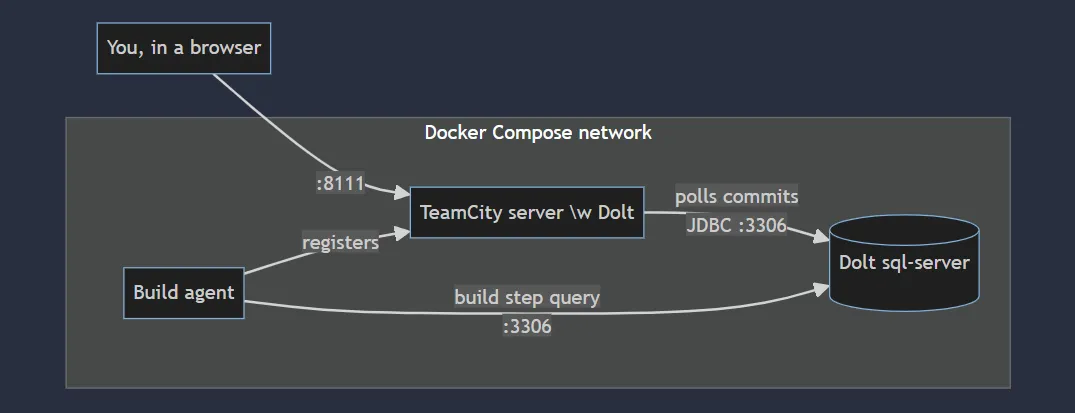
This Compose file is everything you need to follow along:
services:
  dolt:
    image: dolthub/dolt-sql-server:latest
    environment:
      DOLT_ROOT_PASSWORD: dolt
      DOLT_ROOT_HOST: "%"    # let other containers connect as root
    ports:
      - "3306:3306"
  server:
    image: jetbrains/teamcity-server:latest
    ports:
      - "8111:8111"
    volumes:
      - tc_data:/data/teamcity_server/datadir
      - tc_logs:/opt/teamcity/logs
  agent:
    image: jetbrains/teamcity-agent:latest
    environment:
      SERVER_URL: http://server:8111
volumes:
  tc_data:
  tc_logs:
Run docker compose up -d, give TeamCity a couple of minutes to boot,
then open http://localhost:8111 and click through the one-time wizard:
accept the defaults (the internal database is fine for evaluation),
create your admin user, and authorize the agent under Agents,
Unauthorized. Next, install the plugin: download the zip from the
Marketplace page,
upload it on the Plugins page behind the Admin gear in the left-hand
navigation bar, and restart the server. You need TeamCity 2025.11.3 or
newer.
While that restarts, give Dolt something worth building. Connect with
any MySQL client (mysql -h127.0.0.1 -uroot -pdolt) and seed a tiny
game config:
CREATE DATABASE gameconfig;
USE gameconfig;
CREATE TABLE units (id INT PRIMARY KEY, name VARCHAR(64), hp INT, attack INT);
INSERT INTO units VALUES (1,'Footman',100,12),(2,'Archer',70,18),(3,'Knight',180,25);
CALL DOLT_COMMIT('-Am', 'Initial game config');
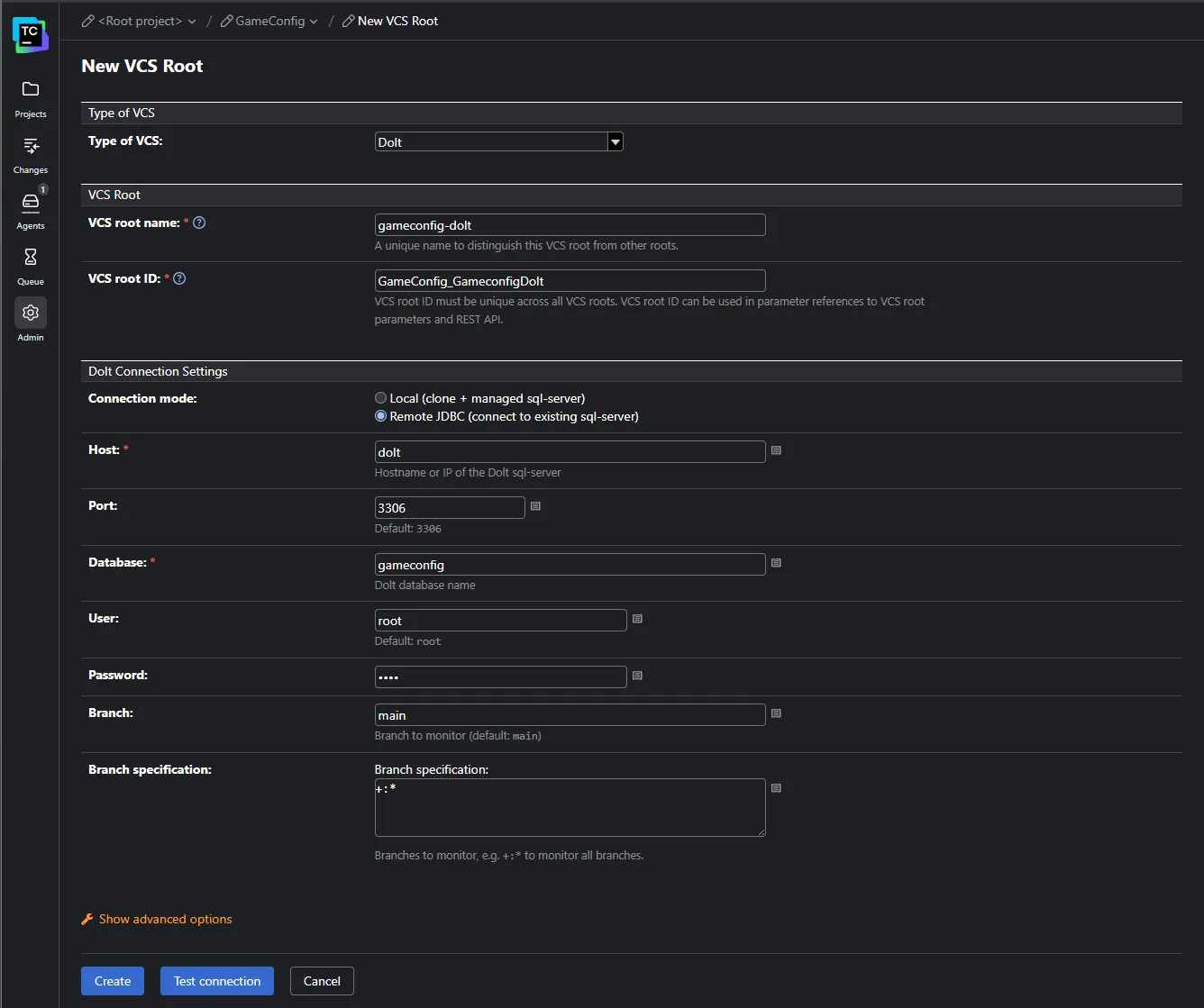
Finally, connect the two. Create a project (TeamCity’s onboarding will
offer to connect VCS hosting accounts and set up pipelines along the way;
skip all of it, because your version control is the database), add a VCS root of
type “Dolt”, and fill in the form: connection mode Remote JDBC, host
dolt (the Compose service name), port 3306, database gameconfig,
user root, password dolt, and branch specification +:* to watch
every branch. Test connection, green.
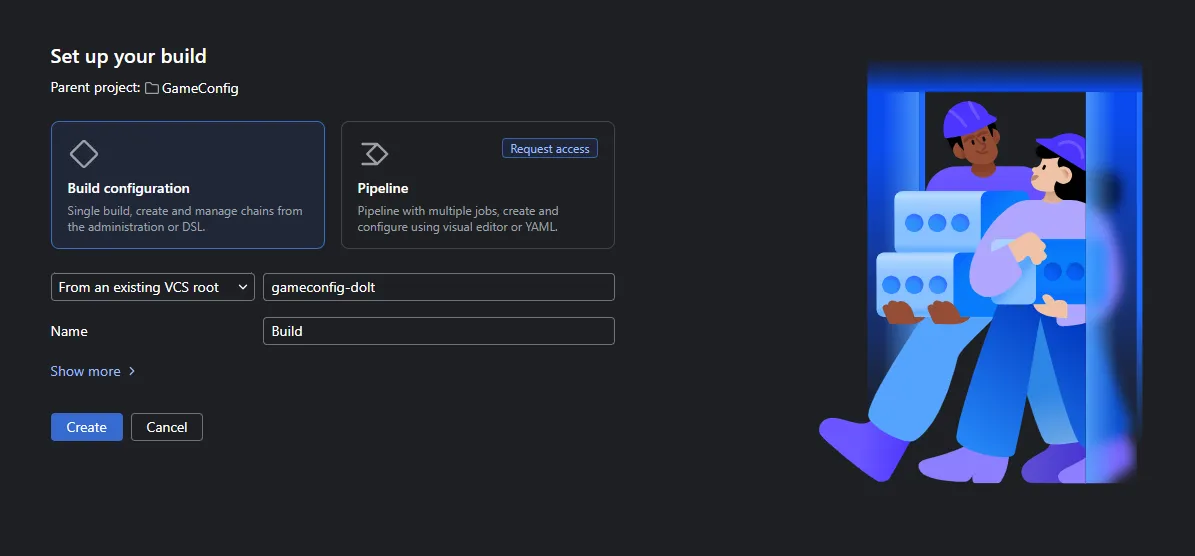
One last piece of plumbing: a build configuration, so those commits have
something to trigger. Click “Create build configuration”, and on the “Set
up your build” page keep the plain “Build configuration” option and pick
your gameconfig-dolt root under “From an existing VCS root”:
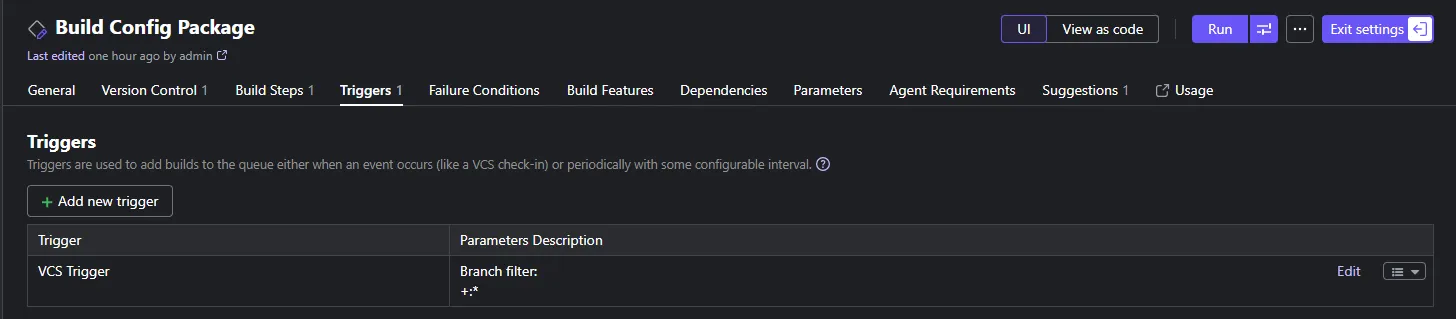
Give it a Command Line build step; even dolt version works as a
placeholder while you wire things up. Then add a
VCS trigger
under Triggers so new commits start builds on their own:
The steps our demo build runs are more specific (i.e., data-quality probes and compilation) which will come up in later sections.
A Data Commit Walks Into a Build#
Here is the whole chain, end to end:
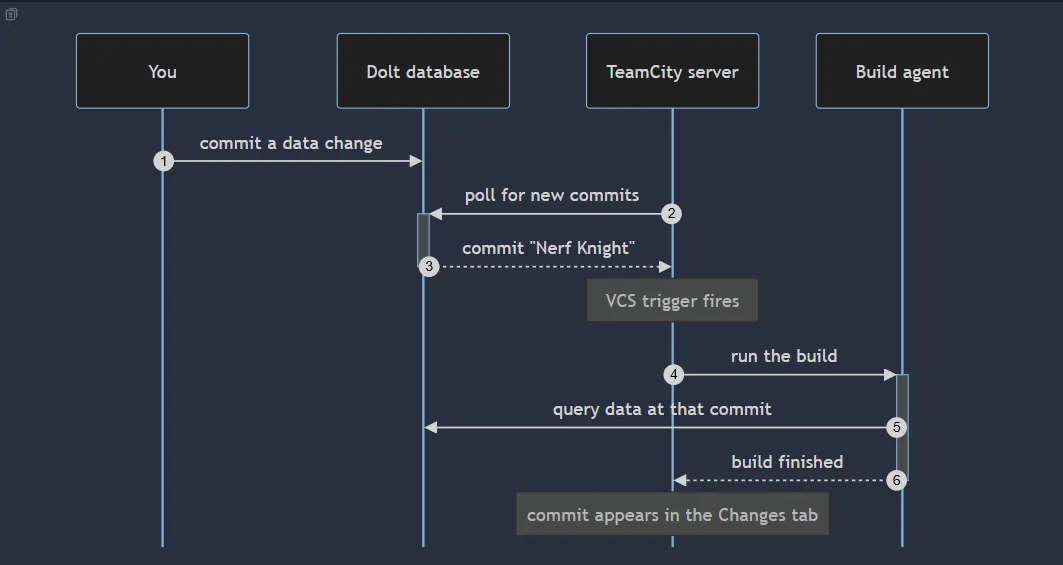
Let’s say a designer is buffing a stat, expressed as SQL against the running server:
CALL DOLT_CHECKOUT('main');
UPDATE units SET attack = 14 WHERE name = 'Footman';
CALL DOLT_COMMIT('-Am', 'Balance pass: buff Footman attack 12 -> 14');
About a minute later the commit is in the Changes tab and the VCS trigger has started a build. A row update just triggered continuous integration.
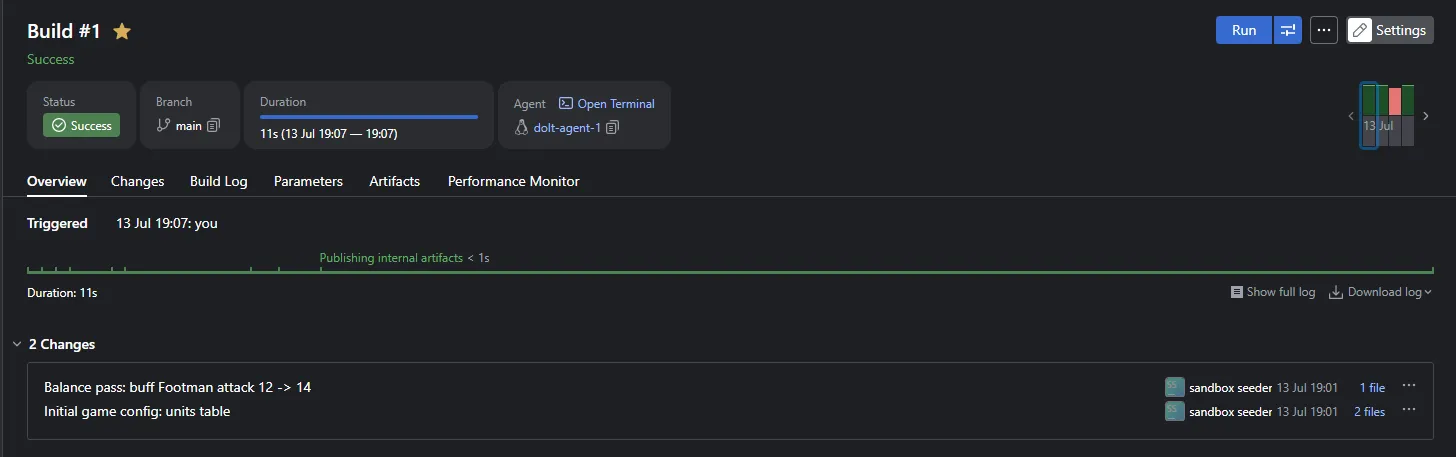
TeamCity hands every build the commit that triggered it as
%build.vcs.number%, and Dolt can
query any table as of any commit.
Build steps therefore read the data exactly as it was at the triggering
revision, even if someone commits again while the build waits in the
queue:
dolt sql -q "SELECT * FROM units AS OF '%build.vcs.number%'"Watch a Test Turn Red#
Our build step runs data-quality probes before anything ships, each reported through TeamCity service messages so a bad commit fails the build as a named red test instead of a wall of log text, and the step halts on a red probe so bad config never reaches the compiler. Here is the entire mechanism, two probes and a gate:
PROBES_FAILED=0
probe() {
  echo "##teamcity[testStarted name='$1']"
  bad=$(dolt --host dolt --port 3306 -u root -p dolt --use-db gameconfig --no-tls \
    sql -q "$2" -r csv | tail -1 | tr -d '\r')
  if [ "${bad:-error}" != "0" ]; then
    echo "##teamcity[testFailed name='$1' message='${bad:-probe query failed} offending rows']"
    PROBES_FAILED=1
  fi
  echo "##teamcity[testFinished name='$1']"
}
probe "data.units.positive_stats" \
  "SELECT COUNT(*) FROM units AS OF '%build.vcs.number%' WHERE hp <= 0 OR attack <= 0"
probe "data.units.unique_names" \
  "SELECT COUNT(*) - COUNT(DISTINCT name) FROM units AS OF '%build.vcs.number%'"

if [ "$PROBES_FAILED" != "0" ]; then
  echo "Data-quality probes failed; skipping compile and package."
  exit 1
fi
A probe is a COUNT(*) of rows that should not exist, and any nonzero answer becomes a
failed test. We committed a unit with attack zero to showcase:
##teamcity[testStarted name='data.units.positive_stats']
##teamcity[testFailed name='data.units.positive_stats' message='1 offending rows']
##teamcity[testFinished name='data.units.positive_stats']
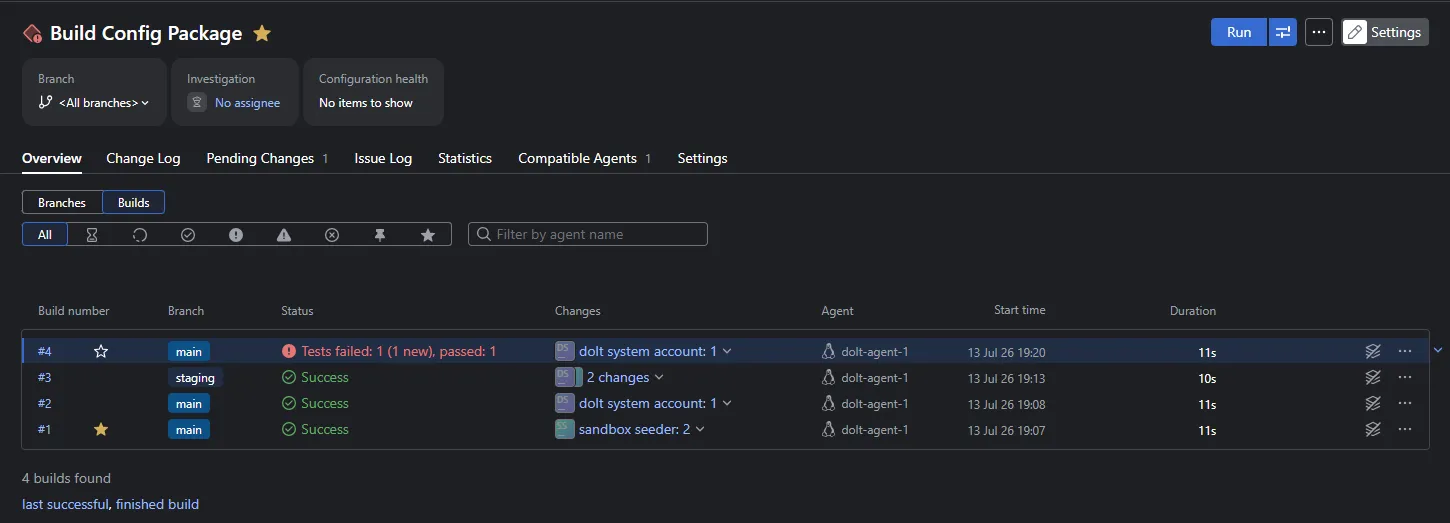
The build goes red in the overview:
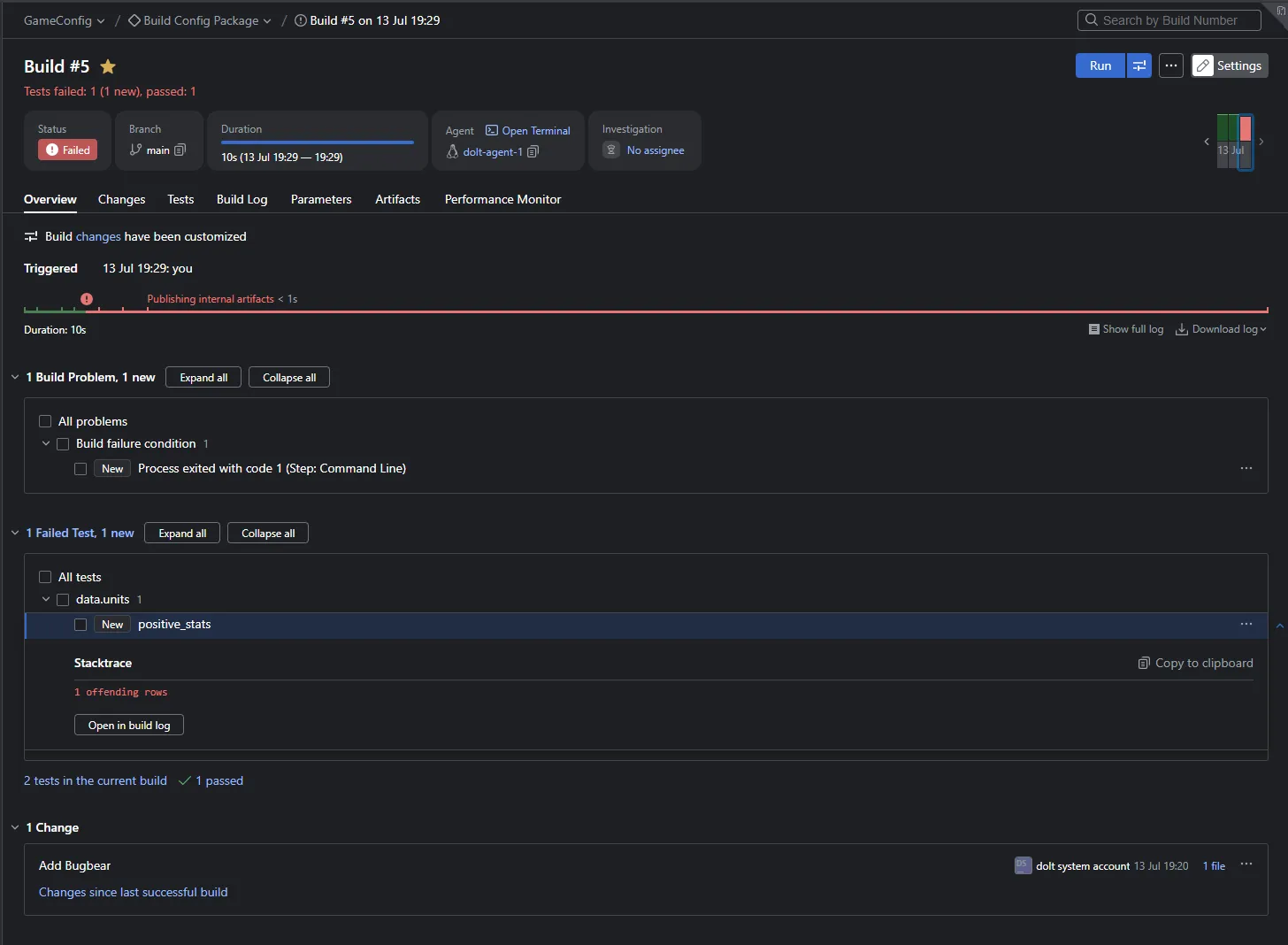
Opening the failed build shows the step halted by the gate:
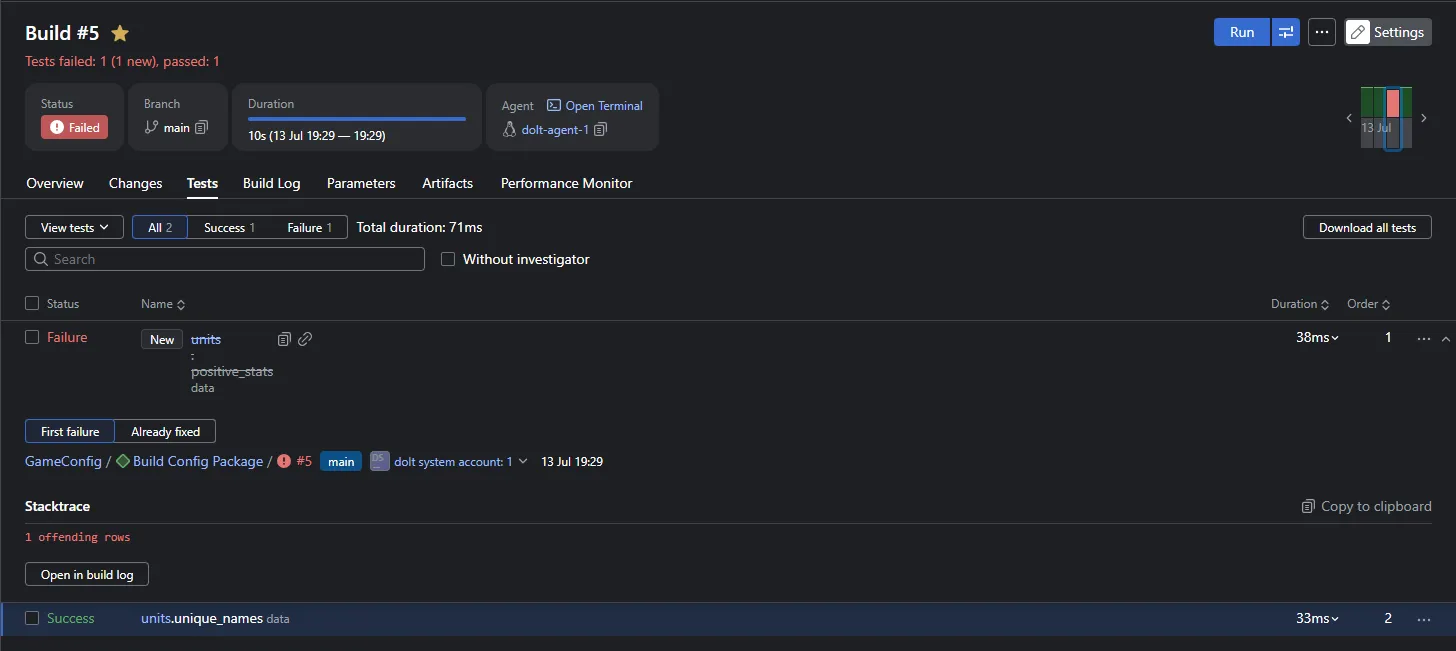
The Tests tab names the exact check that caught it, and nothing gets packaged:
Revert the commit (CALL DOLT_REVERT('HEAD')) and the revert, being
itself a commit, triggers one more build. That one is green.
Two Builds, Two Games, One Commit Apart#
Our build step generates Go source from the config at the pinned revision,
compiles an actual game binary with the Dolt commit stamped inside via
ldflags, and cross-compiles it for Linux, Windows, and Mac from one Linux
agent. The binaries self-identify: the config hnak4bdfk10s in that
first line of output is the real Dolt commit hash the artifact carries.
They are also reproducible. Building the same commit twice yields byte-identical output:
build1 sha256: a1d97cf4d47502e5...
build2 sha256: a1d97cf4d47502e5...
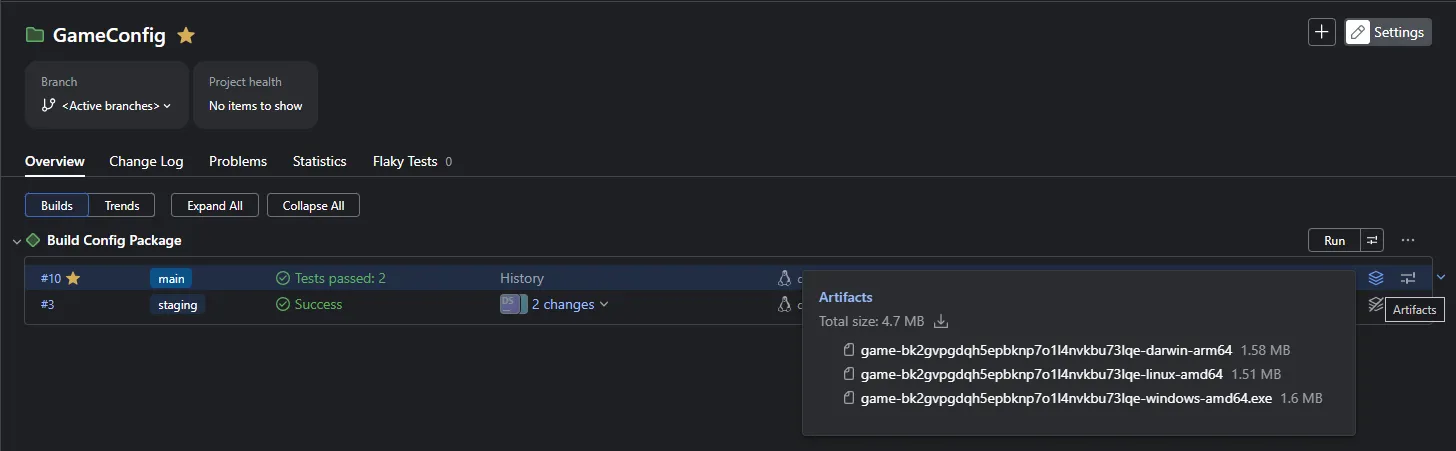
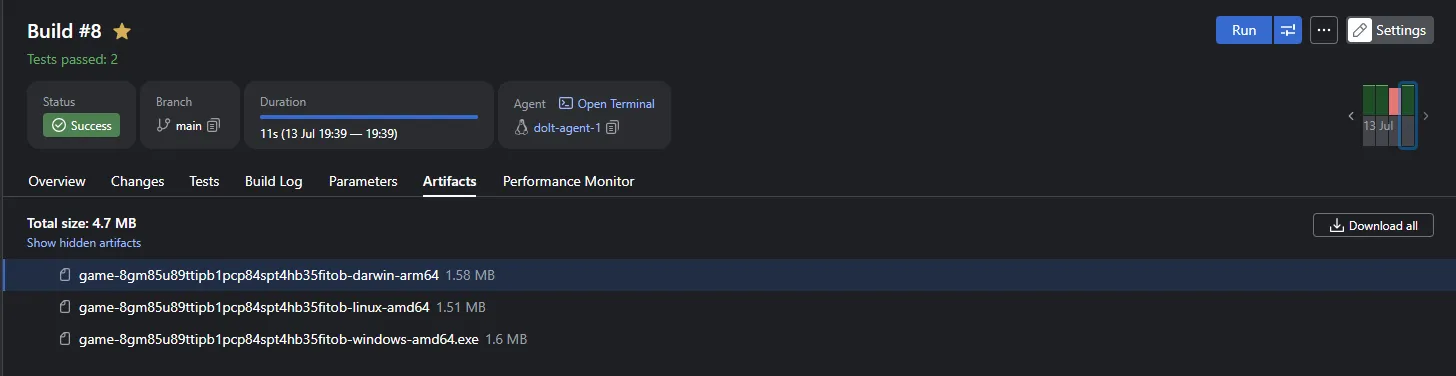
Dolt pins the data, the build pins everything else, and any artifact in the wild traces back to the exact data commit that produced it. The build’s Artifacts tab lists the binaries, each named after its revision:
The Fine Print#
The plugin is young, and its documentation is upfront about the edges: data changes currently show row counts rather than row-level diffs, the Changes tab is a linear list without a commit graph, and there is no write-back yet, so no merges or pre-tested commits driven from TeamCity. That last item is on the roadmap, and it’s the one to watch: CI gating merges to your data the way it gates merges to your code.
If that idea appeals, and you would rather not run your own CI server, we have been building it from the hosted side for a while: DoltHub supports CI testing on data and pull request CI, and we were wiring data CI out of webhooks back in 2020. Yury’s plugin brings the same conviction to your own TeamCity, where your builds may already live.
Conclusion#
The Scorewarrior post asked what you would use a version-controlled SQL database for. This plugin answers one layer up the stack: you build from it, test against it, and ship artifacts traceable to it, with your CI server treating data commits as what they are, commits. Give the plugin a spin, poke at the demo server, and tell Yury what you think. He asked for ideas on showcasing it, and when we checked, the download counter read five. Let’s fix that.
Curious about version-controlled databases, or want to talk CI on data? Stop by the DoltHub Discord and say hello. Our engineering team hangs out there all day.