
Dolt is the world’s first version-controlled SQL database. It keeps every version of every row going all the way back to the first commit. Keeping all of that history makes engineers nervous. A common question from the Dolt-curious is some version of “If Dolt never throws anything away, won’t it eventually eat my whole disk?”
Fair question. The good news is that Dolt works much harder to save space than most engineers assume, and when the built-in techniques aren’t enough, you have a couple of escape hatches. This article walks through both: the storage savings you get for free and what to do when your history has genuinely gotten too big.
Storage-Saving By Design#
Dolt already optimizes for disk usage with four techniques, and you don’t have to do anything to get any of them.
Structural Sharing#
Dolt stores your database as a set of Prolly Trees in a content-addressed chunk store. Every piece of data in the database is broken into chunks, and every chunk is named by the hash of its own contents. That naming scheme is where the magic happens. A chunk is written to disk under its name, so two chunks with the same contents are stored only once.
When you make a commit that changes one row, almost every chunk in the tree is byte-for-byte identical to the chunk from the previous commit. Identical chunks have identical hashes, so they are the same chunk on disk. Dolt only writes the handful of chunks that actually changed, plus the path up the tree to the root.
This is called structural sharing. A commit does not copy your database. Two commits that are 99% the same share 99% of their chunks. A million-row table where you updated ten rows costs you ten rows worth of new storage, not a million. This is the single biggest reason Dolt’s history is so much cheaper than people expect.
Compression#
On top of structural sharing, every chunk is compressed before it hits the disk. Dolt uses Snappy, which is fast and gets you a meaningful chunk of savings for almost no CPU cost.
Automatic Garbage Collection#
Not everything you write turns into a permanent commit: stacked transactions, branches you deleted, working set edits you threw away. That data gets written to the chunk store but never becomes reachable from a commit. Dolt’s garbage collection finds chunks that nothing references anymore and removes them.
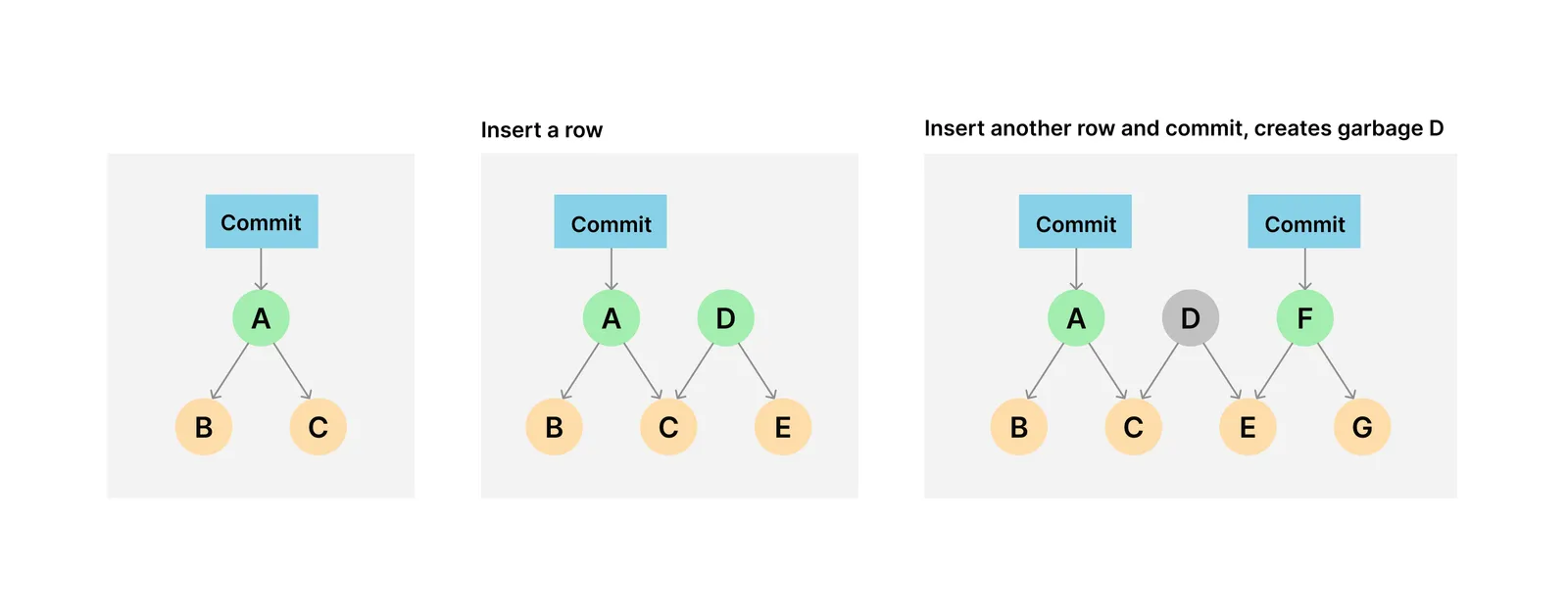
As of Dolt 1.75, garbage collection runs automatically in the background. You don’t have to schedule it or think about it. Dolt keeps the unreferenced cruft from piling up on its own.
Archive Format#
The newest trick is the archive format. When garbage collection decides a set of chunks is here to stay, it repacks them into archive files that use zStandard with dictionary compression.
Dictionary compression is the interesting part. Dolt uses your commit history graph to group chunks that are likely to be similar, builds a compression dictionary for each group, and compresses the whole group against its dictionary. Chunks that are 90% the same as their neighbors compress down to almost nothing. Archives shrink Dolt’s footprint by an additional 30-50% over Snappy, and as of Dolt 1.75, they are on by default, just like automatic garbage collection.
Stack these four together and the typical Dolt database is far smaller than the “every version of everything, forever” description would lead you to believe. Most engineers are never going to have to worry about Dolt blowing out a disk.
Very Large Histories#
But Dolt can still use a lot of disk. The techniques above are about storing your history efficiently. They are not about removing history, because removing history is not something a version control system should do quietly behind your back.
So if you have a table that churns hard, say you rewrite every row every hour for a year, you accumulate a lot of genuinely different chunks. Structural sharing can’t help when the data really did change. Compression can’t help when the data is high-entropy. The history is real, and it costs real bytes.
When that history grows past what you want to pay for, the fix is to compress it. And if you want to keep it around, you can offload a copy somewhere cheaper first.
History Compression#
The first option is to throw away history you no longer need by rewriting it. In Git, you’d reach for an interactive rebase to squash a long string of commits into one. Dolt has the same tool: dolt rebase.
The move is to squash your commits down to a much shorter history, which orphans all the chunks that only those intermediate commits referenced. Then you run dolt gc --full to actually delete the orphaned chunks. A normal garbage collection won’t touch them, because Dolt’s generational GC never revisits the old generation by default. The --full flag is what tells GC to go back and collect everything that is no longer reachable.
Be careful. This is destructive. Squashing commits permanently deletes the history those commits held. Once you dolt gc --full, the intermediate versions are gone for good. Make sure you actually don’t need that history before you do this.
I — well, Claude directed by me — wrote a small shell script that demonstrates the whole flow end to end. It builds a database, churns it across 20 commits, and then squashes and collects. Here is the part that matters:
=== 2. Churn the table over 20 commits ===
History is now 22 commits deep.
On-disk chunk store: 3.1M

=== 3. A full gc can't help yet ===
$ dolt gc --full
On-disk chunk store: 2.8M   <- barely moves; the history is still here

=== 4. Squash the history with 'dolt rebase' ===
History is now 2 commits deep.
On-disk chunk store: 3.0M   <- still big: the old chunks are now orphaned

=== 5. A normal gc still won't reclaim it ===
$ dolt gc
On-disk chunk store: 2.9M   <- still big; old-gen orphans are untouched

=== 6. Reclaim the space with a full gc ===
$ dolt gc --full
On-disk chunk store: 156K   <- space reclaimed
The history went from 22 commits to 2, and the chunk store went from 3.1M to 156K. That is a 20x reduction. Notice that in steps 3 and 5, when and how you run dolt gc matters. In step 3, running dolt gc --full before the rebase barely moves the needle because every commit is still reachable and therefore nothing is garbage. In step 5, a normal dolt gc doesn’t touch the old generation where that orphaned history lives, so very little is reclaimed. You need dolt gc --full.
The scripted squash uses the dolt_rebase procedure so the whole thing runs without an editor:
ROOT=$(dolt log --oneline | tail -1 | awk '{print $1}')
dolt sql <<SQL
call dolt_rebase('-i', '$ROOT');
update dolt_rebase set action = 'squash' where rebase_order > 1;
call dolt_rebase('--continue');
SQL
dolt gc --full
You can run the full thing yourself. It works in a throwaway temp directory and never touches your real data.
This script demos the simplest version of history compression: squash all commits into one commit. But rebase gives you the power to shorten your history surgically. Squash every second commit into one. Keep every 10th commit. Keep a commit per day. Just edit your rebase plan to match your desires.
History Offloading#
The destructive part of history compression is not suitable for all use cases. You are deleting data. The nice thing is you don’t have to choose between “keep the history” and “free the disk.” You can have both.
Before you squash and collect locally, push your database to a remote:
dolt remote add origin <your-remote>
dolt push origin main
Now the full history, every one of those 22 commits, lives on the remote. Your local copy can be squashed and dolt gc --full’d down to the small working size, and if you ever need the old versions back, they are one dolt clone or dolt fetch away. You have offloaded the history you rarely touch to cheaper storage and kept your local disk lean.
This is the pattern I recommend. Treat the remote as the archive of record and your local clone as the part you actively work with.
Conclusion#
Dolt is designed so that keeping all of your history costs far less than you’d guess. Structural sharing, compression, automatic garbage collection, and the archive format do most of the work for you without you lifting a finger. And on the rare occasion that a churny history outgrows those savings, dolt rebase plus dolt gc --full will compress it back down, with a dolt push to a remote first if you want to keep the full history safe.
Don’t worry about Dolt’s disk footprint. We have you covered. As always, you can chat with us about disk space and other concerns on our Discord.