
Today we are excited to announce that Dolt v1.81.10 enables you to use Git remotes as Dolt remotes. This cool new feature makes it even easier to integrate Dolt into your existing development workflows, since your version-controlled SQL databases can live right alongside your source code!
Git remotes are servers that host offline copies of your source code stored in Git. These are things like GitHub, GitLab, and Bitbucket. You can even run your own Git remotes. Typically you push changes from your local copy of the source code to the remote, where you inspect the diff of your changes against the current state of the remote’s copy of the code, then decide if you want to merge your changes into the remote copy. This is done via a pull-request style workflow and is a very powerful, scalable, model for versioning code and supporting distributed engineering workflows.
Dolt remotes are similar. These are servers that host offline copies of your Dolt database and allow you to use this same pull-request style workflow to review and approve changes to your data, the way you would change your code. Traditional remotes for Dolt are DoltHub and DoltLab, although you could also host your own Dolt remote server.
Despite these similarities, it has never been possible to use a Git remote, like GitLab, as a Dolt remote: a place where you can push your Dolt databases. But this has changed in Dolt v1.81.10. Now, using Dolt’s existing remote interfaces, you can configure your Git repositories to store offline remote copies of your Dolt databases!
In today’s blog, I’ll demonstrate how you can get started using this cool new feature, but first, let me tell you why you would even want to do this in the first place.
Why on Earth would I do this?#
Support Beads#
The first reason we added support for Git remotes in Dolt is to better support Dolt’s integration into Beads, Steve Yegge’s foundational agentic memory implementation. Before Steve knew about Dolt, Beads originally stored coding-agent memory in a combination of SQLite and Git. But since he discovered Dolt, we’ve been working with him to make Dolt the default storage layer of Beads.
In doing so, we wanted to minimize disruption to existing Beads customers while we swapped out the storage layer. This meant continued support of seamless syncing of Beads’ changes to the user’s existing Git remote. Whenever a coding-agent “memory” changes, Beads persists this change and pushes it to the Git remote. Before we enabled Git remote support in Dolt, the Beads’ user would need to configure a Dolt remote, like DoltHub or DoltLab, and supply credentials, which no one, not even agents, like to do.
So to minimize friction and enable Beads to continue to seamlessly sync without additional credentials or configuration, we updated Dolt to support Git remotes. This is use case number one.
Store Databases with Code#
Number two, you would do this if you’re a software engineer who wants to use a versioned-controlled SQL database that syncs to the source code repository you already use, without having to mess with or care about a brand new remote service.
If you’re an engineer, chances are you already use something like GitHub or GitLab, and if you wanted to distribute your SQL database exactly like you distribute your code, you can now do so, without needing DoltHub or DoltLab. This is a frictionless way to get started with Dolt and experience its power.
GitHub Actions Integration#
And finally, number three, you can do much more cool shit that was harder to do before. For example, we’ve built CI for Dolt databases on DoltHub and DoltLab, but now if you want to run CI on your SQL database in, say, GitHub Actions, it’s never been easier! Here’s an example workflow of what that would look like.
name: dolt-db-ci

on:
  push:
  pull_request:

permissions:
  contents: read

env:
  # Pin a Dolt version for reproducible CI runs.
  DOLT_VERSION: v1.81.10

jobs:
  dolt:
    runs-on: ubuntu-latest
    steps:
      - name: Checkout Git repository
        uses: actions/checkout@v4
        with:
          fetch-depth: 0

      - name: Install dolt
        shell: bash
        run: |
          set -euo pipefail
          curl -fsSL "https://github.com/dolthub/dolt/releases/download/${DOLT_VERSION}/install.sh" | sudo bash
          dolt version

      - name: Clone Dolt database from this GitHub remote
        shell: bash
        run: |
          set -euo pipefail
          remote="https://x-access-token:${GITHUB_TOKEN}@github.com/${GITHUB_REPOSITORY}.git"
          dolt clone "${remote}" db
        env:
          GITHUB_TOKEN: ${{ github.token }}

      - name: Basic database sanity checks
        shell: bash
        run: |
          set -euo pipefail
          cd db
          dolt status
          dolt sql -q "show tables;" -r csv
          dolt sql -q "select count(*) as commits from dolt_log;" -r csv
This workflow clones the Dolt database from the GitHub repository and runs some queries on it. There’s no additional authentication steps needed since GitHub owns the remote! Pretty cool, right?
Getting Started#
As mentioned earlier you can start using Git remotes immediately with Dolt v1.81.10 in the same way you would any other type of Dolt remote. Below I’ll cover the standard CLI and Dolt sql-server commands to set up a Git remote.
Prerequisites#
Using Git remotes as Dolt remotes has a hard dependency on the Git binary being installed and on your PATH. This is because Dolt runs the binary directly to operate on Git remotes.
One benefit of doing this though is that if your Git binary is already credentialed to your Git remote, when you clone, fetch, push, or pull with Dolt, everything will just work!
One caveat here: currently there is a bug in Dolt v1.81.10 which prevents using Git remotes as Dolt remotes if your Git binary requires username and password credential inputs via STDIN, so you must use a Git authentication method that does not require these.
Next, in order to use a Git remote as a Dolt remote, the Git repository you want to use must first exist on the remote and contain at least one branch.
For example, if you have a GitLab deployment, first create the Git repository on GitLab using their UI, then clone the repo, create a new main branch, and push this branch back up to GitLab. This makes the GitLab repository ready to be used as a Dolt remote.
Alternatively, if you have an existing repository on GitLab that already contains branches, you can simply use that.
It is completely safe to use existing Git repositories as Dolt remotes. The Dolt data will not interfere with your source code or vice versa. We’ll dive deeper into the technical implementation of this feature in a later blog, but for now, you just need to know that your Dolt database’s remote data is stored on a custom ref within your Git repository, and is fully managed by Dolt.
In fact, this ref will not even be cloned, fetched, or pulled by Git when you run those commands, so you don’t need to worry about Dolt’s remote ref consuming additional local storage when you run them. Of course, the remote will contain Dolt data but that’s generally someone else’s problem.
Let’s go through an example now.
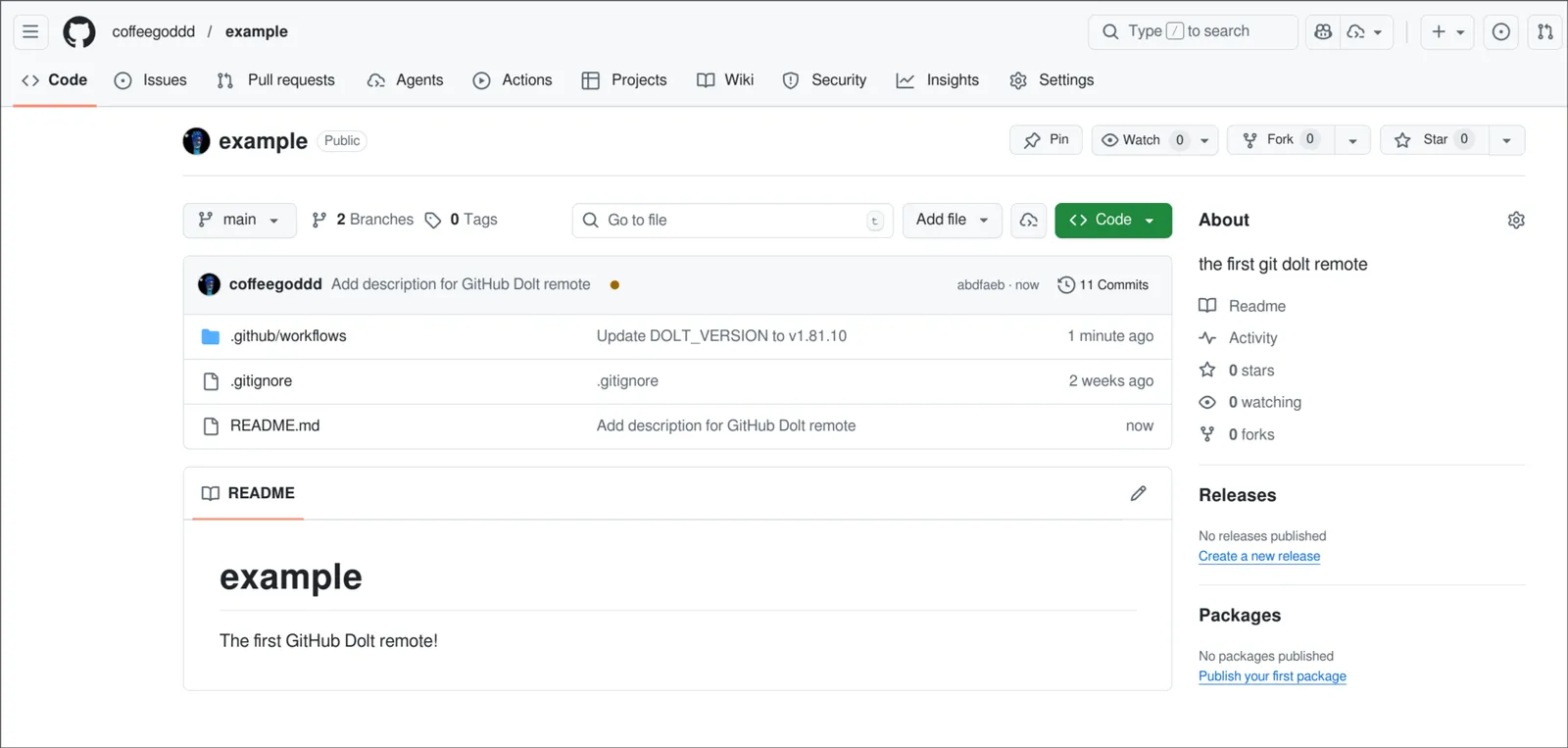
I’ve made a GitHub repository called example, and I want to use it as my Dolt remote. I’ve already created a main branch in it, with a README.md file.
Dolt CLI#
Next, from the Dolt CLI, I’ll simply grab the URL for my Git remote and register it with Dolt. This will work for ssh, http(s), and file Git URLs.
➜  dbs git:(main) ✗ mkdir example
➜  dbs git:(main) ✗ cd example
➜  example git:(main) ✗ dolt init
Successfully initialized dolt data repository.
➜  example git:(main) ✗ dolt sql -q "create table t (pk int primary key);"
➜  example git:(main) ✗ dolt sql -q "insert into t values (1), (2), (3);"
➜  example git:(main) ✗ dolt add .
➜  example git:(main) ✗ dolt commit -m "add table t and insert data"
➜  example git:(main) ✗ dolt remote add origin https://github.com/coffeegoddd/example.git
➜  example git:(main) ✗ dolt remote -v
origin git+https://github.com/coffeegoddd/example.git
In the output above, you can see that I’ve created a new Dolt database called example and inserted a table with some data. Then I created a new Dolt commit and added my new GitHub repository as the Dolt remote by copying the https URL from GitHub.
After adding the remote, I list the remote with dolt remote -v. The remote is successfully registered but has been transformed into the internal representation of a Git remote, one that starts with the git+<type>:// schema.
Now I can simply push this to GitHub:
➜  example git:(main) ✗ dolt push origin main
/ Uploading...To git+https://github.com/coffeegoddd/example.git
 * [new branch]          main -> main
Done! My database is now in my GitHub repository! Interestingly if I navigate through GitHub’s UI, there is no way to actually know or tell that my database data is here. In order to confirm that your Git repository has your Dolt remote data, you actually need to clone the Git repo, then run the following command:
➜  dbs git:(main) ✗ git clone https://github.com/coffeegoddd/example.git git_example
Cloning into 'git_example'...
remote: Enumerating objects: 30, done.
remote: Counting objects: 100% (2/2), done.
remote: Compressing objects: 100% (2/2), done.
remote: Total 30 (delta 0), reused 0 (delta 0), pack-reused 28 (from 1)
Receiving objects: 100% (30/30), 4.05 KiB | 4.05 MiB/s, done.
Resolving deltas: 100% (3/3), done.
➜  dbs git:(main) ✗ cd git_example
➜  git_example git:(main) git ls-remote origin refs/dolt/data
57fc8b2b74ffa8c902e2b5e5e7858cfc2f162149        refs/dolt/data
Above we clone the Git repo and the run the git ls-remote command against the default custom ref Dolt uses to store the remote data. The output shows the commit hash of the refs HEAD.
If you ever want to permanently destroy the Dolt remote data in the Git repository, you simply push an empty ref to this remote ref. The syntax for this is:
git push origin :refs/dolt/datadolt sql-server#
We aren’t gonna destroy our remote data right now. Instead, let’s clone our Dolt database to a new Dolt sql-server.
To do this, first I start a Dolt sql-server on port 3306:
➜  my_dolt_server git:(main) ✗ dolt sql-server --host 0.0.0.0 --port 3306
Starting server with Config HP="0.0.0.0:3306"|T="28800000"|R="false"|L="info"
INFO[0000] Creating root@localhost superuser
INFO[0000] Server ready. Accepting connections.
WARN[0000] secure_file_priv is set to "", which is insecure.
WARN[0000] Any user with GRANT FILE privileges will be able to read any file which the sql-server process can read.
WARN[0000] Please consider restarting the server with secure_file_priv set to a safe (or non-existent) directory.
Next, I connect a MySql client to it and clone the database using the Git URL.
➜  my_dolt_server git:(main) ✗ mariadb --host 0.0.0.0 -uroot --skip-ssl
Welcome to the MariaDB monitor.  Commands end with ; or \g.
Your MySQL connection id is 2
Server version: 8.0.33 Dolt

Copyright (c) 2000, 2018, Oracle, MariaDB Corporation Ab and others.

Type 'help;' or '\h' for help. Type '\c' to clear the current input statement.

MySQL [(none)]> show databases;
+--------------------+
| Database           |
+--------------------+
| information_schema |
| my_dolt_server     |
| mysql              |
+--------------------+
3 rows in set (0.001 sec)

MySQL [(none)]> call dolt_clone('https://github.com/coffeegoddd/example.git');
+--------+
| status |
+--------+
|      0 |
+--------+
1 row in set (7.601 sec)

MySQL [(none)]> show databases;
+--------------------+
| Database           |
+--------------------+
| example            |
| information_schema |
| my_dolt_server     |
| mysql              |
+--------------------+
4 rows in set (0.001 sec)

MySQL [(none)]> use example;
Reading table information for completion of table and column names
You can turn off this feature to get a quicker startup with -A

Database changed
MySQL [example]> show tables;
+-----------------------------+
| Tables_in_example           |
+-----------------------------+
| t                           |
+-----------------------------+
1 row in set (0.001 sec)

MySQL [example]> select * from t;
+----+
| pk |
+----+
|  1 |
|  2 |
|  3 |
+----+
3 rows in set (0.001 sec)
Boom! We’ve cloned the Dolt database from GitHub to our Dolt server.
Now let’s make a new edit and push our changes back to the remote.
MySQL [example]> insert into t values (4), (5), (6);
Query OK, 3 rows affected (0.003 sec)

MySQL [example]> call dolt_commit('-Am', 'insert more data');
+----------------------------------+
| hash                             |
+----------------------------------+
| 0olniurimtbugg3tnd5pf4cklt14m89q |
+----------------------------------+
1 row in set (0.003 sec)

MySQL [example]> call dolt_push('origin', 'main');
+--------+---------------------------------------------------------------------------------------------------+
| status | message                                                                                           |
+--------+---------------------------------------------------------------------------------------------------+
|      0 | To git+https://github.com/coffeegoddd/example.git
 * [new branch]          main -> main |
+--------+---------------------------------------------------------------------------------------------------+
1 row in set (28.506 sec)
If we go back to our local clone where we ran the Dolt CLI initially, we can pull down these latest changes.
➜  my_dolt_server git:(main) ✗ cd ../example
➜  example git:(main) ✗ dolt pull origin main
/ Pulling...Fast-forward
Updating bf1654t6e2vuiqbqn610jlb4lf94pgr6..0olniurimtbugg3tnd5pf4cklt14m89q
Everything up-to-date
➜  example git:(main) ✗ dolt sql -q "select * from t"
+----+
| pk |
+----+
| 1  |
| 2  |
| 3  |
| 4  |
| 5  |
| 6  |
+----+

➜ example git:(main) ✗Conclusion#
We are really excited about this feature and we hope it encourages you to give Dolt a try. We believe Dolt is the best database for AI and specifically for managing agentic memory.
If you’re interested in finding out how you can start building with Dolt, come by our Discord. We’d love to chat with you.