
2026 has been a truly fun year for agentic engineering. New frontier models ship almost weekly and keep getting better, making coding faster than ever before. In response, our engineering team at DoltHub has aimed to stay open and flexible about the model and harness we drive daily, alternating frequently between Claude Code with Opus and Fable, and Codex with Sol and Astra. Tim prefers to drive an additional Grok agent as well, which lets him compare the performance and trade-offs of all three agents in real time.
Also announced earlier this year was the release of Jev from TypeSafe, which is a different kind of model entirely. TypeSafe classifies Jev as a “System One” model, the first of its kind, whereas the frontier large language models (LLMs) behind all the major AI agents up to this point could be considered “System Two” models.
The system classification they use comes from the idea Daniel Kahneman popularized in his book Thinking, Fast and Slow, which describes two modes of thought: fast and intuitive thinking (“System 1”) and slower, more deliberate thinking (“System 2”).
Like an LLM, Jev understands natural-language input, but it doesn’t write any code or return a chat response the way Claude Code or Codex do. Instead, you give it some content to evaluate, which TypeSafe calls the state, along with one or more narrowly scoped questions about that state, and Jev returns a consistent, structured, typed answer to each question you asked, much faster that a system two model would and at a fraction of the cost.
This makes Jev a natural fit for AI-powered applications that need to make intelligent, predictable decisions quickly and cheaply.
And because we like trying new tech at DoltHub, we wanted to give Jev a try. It turned out there was a good place for it in our internal sales-leads pipeline.
We run this pipeline to create a report that helps our business development team find leads. It takes the IP addresses that show up in the usage metrics from our products and maps them to the organizations that own them. Then it ranks those organizations by their usage, favoring ones running long-lived servers and ones whose usage is new or growing, since we think those are the most promising leads.
Before Jev, our pipeline looked like this:
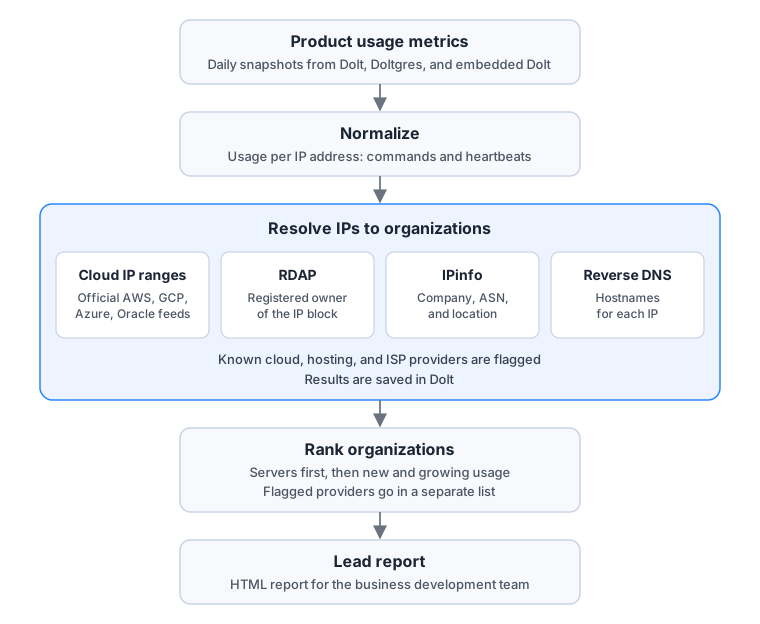
The pipeline starts with daily snapshots of our products’ usage metrics, which are then normalized into usage per IP address, like how many commands each IP ran and whether a long-running SQL server sent any metrics heartbeats.
Next, it resolves each IP to an organization. First, it checks the IP against the official IP ranges AWS, GCP, Azure, and Oracle publish for their clouds, and does an RDAP lookup to find the registered owner of the IP’s address block. Then, it queries IPinfo for details like the company name, autonomous system number (ASN), and location tied to the IP, and does a reverse DNS lookup to get the IP’s hostname.
Along the way, IPs belonging to known cloud, hosting, and internet service providers get flagged for removal, and lastly, the pipeline ranks the remaining organizations and turns them into a report for our business development team.
In this form, the pipeline’s results were very noisy. Even with the major clouds and our list of known providers flagged, smaller internet service providers and hosting companies still dominated the organizations identified in the report, which meant our business development team had to do a lot of manual filtering to find the real leads.
This is where we thought Jev might help. The idea was to use Jev to catch the non-leads our existing filters missed, mainly internet service providers and smaller hosting and cloud services companies. For each organization the pipeline hadn’t already flagged, we planned to give Jev what we knew about it and ask whether it was one of those types of companies. If Jev said it was, we’d drop it from the result set. If Jev said it was not, or it wasn’t sure, we’d keep it in the result set.
Here’s where Jev fits into the pipeline:
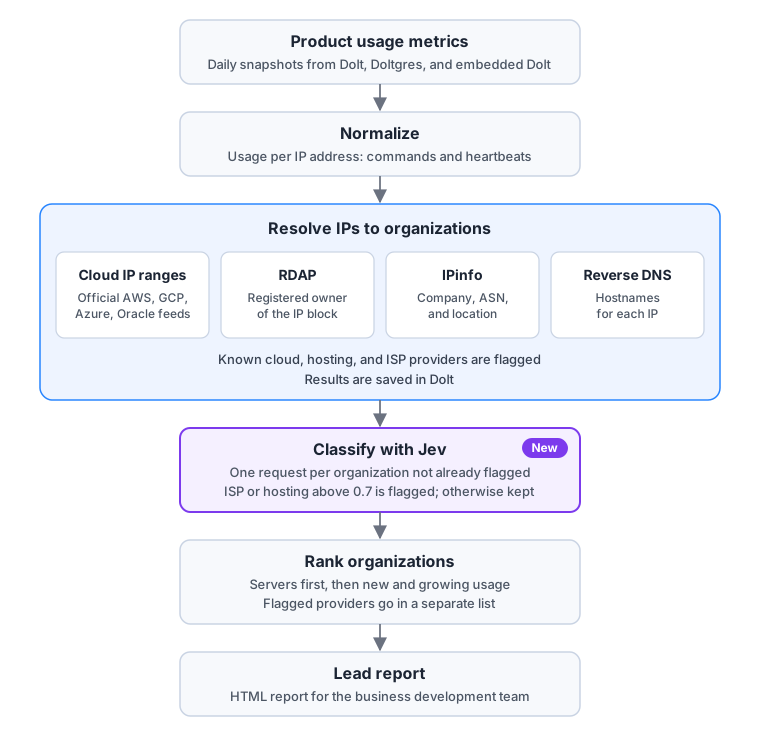
Those of you familiar with the brilliance of Jian-Yang from Silicon Valley may recognize this as essentially his hotdog, not hotdog app. And to be honest, that’s kind of exactly what we wanted here. Glizzies only in our leads report.

Interestingly, Jev is a black box in the sense that it doesn’t tell you anything about how it arrived at its answer. For the boomers, this is kind of like a Magic 8 Ball, the toy with the 20-sided die floating in blue liquid. You ask it what you need to ask it, it answers, and you decide how much you trust whichever side of the die faced you when you looked at it.
In Jev’s case, the blue liquid is a pretrained language model, which is much better, but it still needs to tell us how much we can trust the responses it gives.
I think we tend to trust chat-based models more, maybe more than we should, because we can watch their chain of thought, interact with them, and ask follow-up questions, which gives us confidence that what they’ve done is the right thing. But Jev doesn’t have any of that.
Instead, as part of its response, it tells you how sure it is. Depending on the question type, Jev returns calibrated probabilities, a confidence score, or both.
According to the documentation, a confidence score is a number from 0 to 1 that measures how concentrated Jev’s probabilities are, where 1 means all the probability is on one answer, and 0 means it’s spread evenly across all the possible answers.
TypeSafe is careful to clarify that this isn’t the probability that Jev’s answer is correct. Instead, it’s a measure of how decisively Jev favored its answer over the alternatives.
Getting a confidence score in the response at all also depends on the type of question you asked Jev. Choice questions (pick one option from a list) and Score questions (rate something on a scale) return a confidence score, but the yes or no questions we are using in our leads pipeline, which TypeSafe calls Nouls, don’t.
Jev’s answer to a Noul is just a decimal between 0.0 and 1.0 reflecting the probability that the actual answer is yes.
Stated another way, near 1.0 means Jev is pretty sure it’s a yes, and near 0.0 means it’s pretty sure it’s a no. Near 0.5 means Jev is unsure.
Because Jev’s probabilities are calibrated across many answers, of all the questions Jev answers with a 0.8, about 80% should actually turn out to be a yes, though that’s no guarantee for any single answer. TypeSafe suggests treating anything above 0.7 as a yes, anything below 0.3 as a no, and anything in between as unsure.
So let’s look at an example of how we can use Jev in our leads pipeline to filter out the noise.
A Jev request has two parts, the state and one or more questions about the state. So we need to figure out which question(s) to ask Jev, and what context to supply as state alongside them to get the best results.
For our use case, we avoided asking Jev one big question like “is this a non-lead?”
TypeSafe’s docs are pretty firm about keeping each question to a single judgment, and “hiding several judgments inside one question” is on their list of things to avoid. So instead, we always ask two Noul questions about the organization’s name, and add three more if we have reverse DNS hostnames for its IPs.
First, we ask “does this organization sell internet access to homes or businesses?” and “does this organization rent servers, virtual machines, colocation, or content delivery to other companies?”
Then, if we have reverse DNS hostnames for the organization’s IPs, we also ask three questions about the most common domain in those hostnames:
“Is this domain a domain of the organization itself?”, “is this domain the domain of an internet service provider that sells internet access to homes or businesses?”, and finally, “is this domain the domain of a hosting, VPS, or cloud provider that rents servers to other companies?”
It’s not totally clear that neuroses like ours would pay off with Jev, but it’s also not totally clear that they won’t.
All the questions can actually go to Jev in a single request, and each one comes back as its own Noul in the response.
Here’s what all five questions look like in a Jev request:
{
  "questions": {
    "sells_internet_access": {
      "type": "noul",
      "instructions": "Does `organization.name` sell internet access to homes or businesses?",
      "criteria": {
        "true": "A telecom, cable, fiber, DSL, mobile, or wireless carrier, or another internet service provider whose customers reach the internet through its network.",
        "false": "A company whose main business is something other than selling internet connectivity, such as software, manufacturing, finance, or retail."
      }
    },
    "hosting_or_cloud": {
      "type": "noul",
      "instructions": "Does `organization.name` rent servers, virtual machines, colocation, or content delivery to other companies?",
      "criteria": {
        "true": "A cloud, hosting, data-center, or CDN provider whose addresses carry many unrelated customers' workloads.",
        "false": "An organization that runs servers only for its own business."
      }
    },
    "domain_belongs_to_org": {
      "type": "noul",
      "instructions": "Is `network.hostname_domain` a domain of `organization.name` itself?",
      "criteria": {
        "true": "The domain is the organization's own, or belongs to a brand or subsidiary it operates.",
        "false": "The domain belongs to a different company, such as an internet or hosting provider that supplies the organization's connection."
      }
    },
    "domain_isp": {
      "type": "noul",
      "instructions": "Is `network.hostname_domain` the domain of an internet service provider that sells internet access to homes or businesses?"
    },
    "domain_hosting": {
      "type": "noul",
      "instructions": "Is `network.hostname_domain` the domain of a hosting, VPS, or cloud provider that rents servers to other companies?"
    }
  }
}
The backticked names, like organization.name and network.hostname_domain, point Jev at specific fields in the state, which TypeSafe recommends, and the criteria describe what a yes and a no look like. The last three questions only go in the request when we have reverse DNS hostnames.
And here’s the state our pipeline sent to Jev for a real organization, a small regional internet service provider that showed up in the Dolt section of our report as an organization to review. We’ve swapped its identifying details for made-up ones:
{
  "organization": {
    "name": "EXAMPLE FIBER LLC"
  },
  "network": {
    "registry_network_name": "EXAMPLE-FIBER",
    "address_block": "A block of 8,192 addresses registered to this organization",
    "estimated_location": "Springfield, Illinois, US",
    "hostname_domain": "example.net",
    "reverse_dns_hostnames": [
      "x.x.x.x.example.net"
    ]
  }
}
The name, network name, and address block values come from our RDAP lookup and the location comes from the IPinfo lookup. The hostnames come from our reverse DNS lookup.
Notice there are no IP addresses anywhere in our state. We don’t send them to Jev and we mask any digits in a hostname that look like part of an address. We also compute the block size in code and describe it to Jev in words.
Once we’ve built the request, here’s what Jev sends back (in under 200 milliseconds):
{
  "model": "jev-1.14.0",
  "answers": {
    "domain_belongs_to_org": { "type": "noul", "noul": 0.9 },
    "domain_isp": { "type": "noul", "noul": 0.3 },
    "domain_hosting": { "type": "noul", "noul": 0.49 },
    "sells_internet_access": { "type": "noul", "noul": 0.42 },
    "hosting_or_cloud": { "type": "noul", "noul": 0.59 }
  },
  "usage": { "input_tokens": 673, "output_tokens": 100 }
}
From the response, you can see that Jev is pretty sure the hostname domain is the organization’s own, 0.9. But it gives 0.3 for the domain ISP question, right on the edge of a no, and 0.49, unsure, for the domain hosting question.
The answers to the name questions also land in the middle, at 0.42 for ISP and 0.59 for hosting. Because nothing crossed the 0.7 threshold, the pipeline doesn’t flag the organization and keeps it in the report, just in case.
Funnily enough, the actual organization behind this response really is an ISP, a small regional fiber provider, so this one would have slipped through into the final report. Still, Jev catches a lot of them that were previously missed. This experiment has also inspired us to find more ways to use Jev internally to optimize our other processes.
Conclusion#
It’s a pretty exciting time to be an engineer and experiment with all the new technologies at our fingertips. In fact, a Jev competitor from Google, the Gemini Decisions API, launched just yesterday! What are the odds?
If you’re building on Jev, we’d love to hear about it. Come by our Discord and let us know.