
Dolt is a MySQL-compatible SQL database with Git-style version control built in. You can branch, merge, diff, clone, push, and pull your data just like you do with source code. You can also connect Dolt to MySQL’s binlog replication protocol, which opens up several useful architectures between MySQL (or MariaDB) and Dolt.
Replicas tend to be enthusiastic little copy machines. Unless told otherwise, they copy every change they receive. That is exactly what you want for a hot standby, but it can be wasteful when a replica serves a narrower purpose and only needs changes from a particular family of tables.
A Dolt user recently opened a feature request asking us to support MySQL’s REPLICATE_WILD_DO_TABLE and REPLICATE_WILD_IGNORE_TABLE filters. It was a useful, well-scoped request, and we were happy to turn around the wildcard filtering support in less than a week. It shipped in Dolt 2.3.5.
Let’s look at why you might want a filtered replica and then investigate a string of suspicious lunch disappearances. This investigation may be more rigorous than the situation warrants, but that has never stopped a database engineer before.
Why Filter a Replica?#
Traditional replication use cases usually need a complete copy of the source database:
- A high-availability replica needs all the data so it can take over if the primary fails.
- A disaster-recovery replica needs a complete copy in another availability zone or region.
- A read-scaling replica often serves the same application queries as the primary.
Filtered replicas solve a different problem. An analytics replica may only need orders_* and sales_* tables. A service-specific read model may only need tables owned by one application domain. A regional replica may only need tables named for that region. You may also want to exclude high-volume scratch or archive tables that provide no value on the replica.
One of my favorite uses of Dolt’s binlog replication support is adding a Dolt replica to an existing MySQL or MariaDB system. The application keeps using its current primary while Dolt receives selected changes and turns them into versioned Dolt commits. This gives you a queryable history, including diffs between revisions, without requiring a full database migration on day one.
Wildcard Table Filters#
Dolt already supported exact table filters through REPLICATE_DO_TABLE and REPLICATE_IGNORE_TABLE. Dolt 2.3.5 adds the wildcard variants:
REPLICATE_WILD_DO_TABLEreplicates row changes from tables that match a pattern and excludes unmatched tables.REPLICATE_WILD_IGNORE_TABLEreplicates row changes normally but skips tables that match a pattern.
Patterns contain a database pattern and a table pattern separated by a period. They use MySQL’s wildcard syntax:
| Pattern | Meaning |
|---|---|
% | Match any sequence of bytes |
_ | Match one byte |
\% | Match a literal percent sign |
\_ | Match a literal underscore |
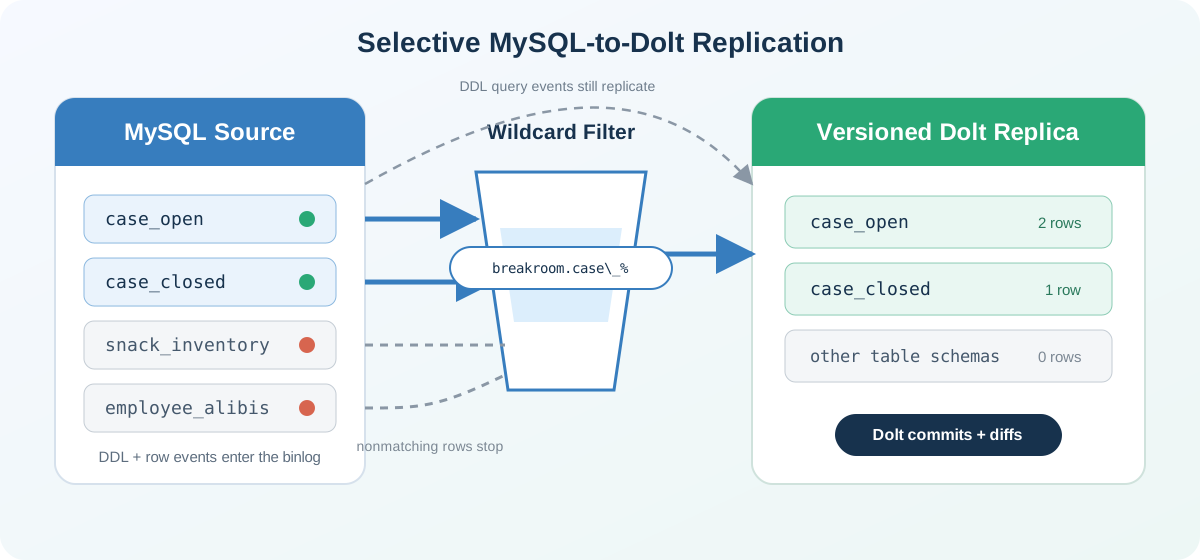
For example, sales.orders% matches tables in the sales database whose names start with orders. Because _ is a wildcard, a literal underscore must be escaped. The pattern breakroom.case\_% matches case_open and case_closed, but not caseworker_notes.
The Great Office Lunch Investigation#
For this demo, we have a MySQL source server and a Dolt replica. The MySQL server is running on port 11229 with GTIDs, binary logging, and row-format binlogs enabled. If you already have a MySQL source configured, you can skip the setup below, but keep in mind that you’ll need to update the replica configuration below with your existing server’s details. If your source contains existing data, our versioned MySQL replica guide also explains how to warm the replica with a snapshot before starting replication.
Start a Local MySQL Source#
First, create an isolated MySQL data directory. --initialize-insecure gives the local root account no password, which is convenient for this disposable demo and a terrible production security policy.
mkdir mysql-source
cd mysql-source

mysqld --no-defaults \
  --initialize-insecure \
  --datadir="$PWD/data"
Now start MySQL with binary logging, row-format events, GTIDs, and a unique server ID:
mysqld --no-defaults \
  --datadir="$PWD/data" \
  --port=11229 \
  --bind-address=127.0.0.1 \
  --socket="$PWD/mysql.sock" \
  --server-id=41 \
  --log-bin="$PWD/mysql-bin" \
  --binlog-format=ROW \
  --gtid-mode=ON \
  --enforce-gtid-consistency=ON \
  --mysqlx=0 \
  --pid-file="$PWD/mysql.pid" \
  --log-error="$PWD/mysql.err"
The four settings that matter to replication are:
server-id=41uniquely identifies this source in the replication topology.log-binenables the binary log that replicas consume.binlog-format=ROWrecords the changed rows instead of replaying DML statements.gtid-modeandenforce-gtid-consistencyenable GTID auto-positioning.
Leave that terminal running. In another terminal, connect to the source over TCP:
mysql --protocol TCP -h 127.0.0.1 -P 11229 -urootYou can verify the important settings from the MySQL shell:
SHOW VARIABLES
WHERE Variable_Name IN
  ('log_bin', 'binlog_format', 'enforce_gtid_consistency', 'gtid_mode', 'server_id');
+--------------------------+-------+
| Variable_name            | Value |
+--------------------------+-------+
| binlog_format            | ROW   |
| enforce_gtid_consistency | ON    |
| gtid_mode                | ON    |
| log_bin                  | ON    |
| server_id                | 41    |
+--------------------------+-------+
From a MySQL shell connected to the source, create a dedicated replication user:
CREATE USER 'replicator'@'%' IDENTIFIED BY 'password';
GRANT REPLICATION SLAVE ON *.* TO 'replicator'@'%';
Start the Dolt Replica#
Next, start a fresh Dolt SQL server for the replica. This demo requires Dolt 2.3.5 or later.
mkdir dolt-replica
cd dolt-replica
dolt init --name "Lunch Detective" --email "detective@example.com"
dolt sql-server --port 11230
In another terminal, connect to the Dolt server with the MySQL client:
mysql --protocol TCP -h 127.0.0.1 -P 11230 -urootConfigure the MySQL source, install our wildcard filter, and start replication:
SET @@GLOBAL.server_id = 42;

CHANGE REPLICATION SOURCE TO
  SOURCE_HOST = '127.0.0.1',
  SOURCE_PORT = 11229,
  SOURCE_USER = 'replicator',
  SOURCE_PASSWORD = 'password',
  SOURCE_AUTO_POSITION = 1;

CHANGE REPLICATION FILTER
  REPLICATE_WILD_DO_TABLE = ('breakroom.case\\_%');

START REPLICA;
One restart note: MySQL does not persist filters set with
CHANGE REPLICATION FILTER, and Dolt matches that behavior. The connection settings fromCHANGE REPLICATION SOURCEpersist, but you must apply the wildcard filter again after restarting the Dolt server. For a planned restart, runSTOP REPLICAbefore shutting down, then reapply the filter before runningSTART REPLICAagain. This avoids briefly auto-starting replication without the filter in place.
There are two backslashes in the SQL string because one escapes the other in the string literal. The resulting filter pattern contains one backslash, which tells the wildcard matcher to treat the underscore literally.
CHANGE REPLICATION FILTER cannot run while the replica SQL thread is active. If you are changing filters on an existing replica, run STOP REPLICA first, update the filters, and then run START REPLICA again.
We can confirm that both replication and the filter are active:
SHOW REPLICA STATUS\GThe complete output contains more replication state, but these are the fields we care about:
            Replica_IO_Running: Yes
           Replica_SQL_Running: Yes
       Replicate_Wild_Do_Table: breakroom.case\_%
   Replicate_Wild_Ignore_Table:
Now reconnect to the MySQL source and create the world’s most over-engineered breakroom incident-response system:
mysql --protocol TCP -h 127.0.0.1 -P 11229 -urootCREATE DATABASE breakroom;
USE breakroom;
CREATE TABLE case_open (
id INT PRIMARY KEY,
missing_lunch VARCHAR(100),
prime_suspect VARCHAR(100)
);
CREATE TABLE case_closed (
id INT PRIMARY KEY,
missing_lunch VARCHAR(100),
resolution VARCHAR(100)
);
CREATE TABLE snack_inventory (
id INT PRIMARY KEY,
snack VARCHAR(100),
quantity INT
);
CREATE TABLE employee_alibis (
id INT PRIMARY KEY,
employee VARCHAR(100),
alibi VARCHAR(200)
);Next, add a little evidence:
INSERT INTO case_open VALUES
  (1, 'Greek yogurt', 'The new intern'),
  (2, 'Leftover pizza', 'Anyone working past 6 PM');

INSERT INTO case_closed VALUES
  (1, 'Turkey sandwich', 'Owner ate it and forgot');

INSERT INTO snack_inventory VALUES
  (1, 'Sea salt chips', 14),
  (2, 'Emergency chocolate', 0);

INSERT INTO employee_alibis VALUES
  (1, 'Zach', 'In a meeting with twelve witnesses'),
  (2, 'Neil', 'Claims he has never seen a sandwich');
Back on the Dolt replica, all four tables exist:
USE breakroom;
SHOW TABLES;
+---------------------+
| Tables_in_breakroom |
+---------------------+
| case_closed         |
| case_open           |
| employee_alibis     |
| snack_inventory     |
+---------------------+
This is an important detail: replication table filters apply to row events. MySQL sends DDL such as CREATE TABLE in query events, so DDL is not filtered. The replica knows that all four tables exist; it has merely been instructed not to gossip about all of their rows.
Let’s count the rows:
SELECT 'case_open' AS table_name, COUNT(*) AS replicated_rows FROM case_open
UNION ALL
SELECT 'case_closed', COUNT(*) FROM case_closed
UNION ALL
SELECT 'snack_inventory', COUNT(*) FROM snack_inventory
UNION ALL
SELECT 'employee_alibis', COUNT(*) FROM employee_alibis;
+-----------------+-----------------+
| table_name      | replicated_rows |
+-----------------+-----------------+
| case_open       |               2 |
| case_closed     |               1 |
| snack_inventory |               0 |
| employee_alibis |               0 |
+-----------------+-----------------+
The wildcard filter admitted row changes for case_open and case_closed and skipped the other two tables. Neil’s alibi has been filtered out, which may be for the best.
Dolt Version Control#
Because the replica is Dolt, the replicated transactions also create versioned history. By default, Dolt creates a new commit as each source transaction is applied, and the commit message records the source GTID. We can see the latest two replicated transactions in dolt_log:
SELECT LEFT(commit_hash, 8) AS commit_hash, message
FROM dolt_log
LIMIT 2;
+-------------+-------------------------------------------------------------------------+
| commit_hash | message                                                                 |
+-------------+-------------------------------------------------------------------------+
| dp5f0jhp    | Dolt binlog replica commit: GTID 614fa9ba-b5e2-11f1-9b3e-274e157c3285:9 |
| 47e7htpp    | Dolt binlog replica commit: GTID 614fa9ba-b5e2-11f1-9b3e-274e157c3285:8 |
+-------------+-------------------------------------------------------------------------+
Your commit hashes and source UUID will be different, but the messages will identify the source transaction behind each commit. That history is queryable data, not a stack of opaque binlog files.
When investigating a change, we can start with dolt_diff_stat() to see which tables changed between two commits and how many rows were added, deleted, or modified. Here we compare the latest commit with its parent:
SELECT table_name, rows_added, rows_deleted, rows_modified
FROM dolt_diff_stat('HEAD~', 'HEAD');
+-------------+------------+--------------+---------------+
| table_name  | rows_added | rows_deleted | rows_modified |
+-------------+------------+--------------+---------------+
| case_closed |          1 |            0 |             0 |
+-------------+------------+--------------+---------------+
The stats point us to case_closed, where one row was added. Now we can use dolt_diff() with the same two commits to see the exact change:
SELECT diff_type, to_id, to_missing_lunch, to_resolution
FROM dolt_diff('HEAD~', 'HEAD', 'case_closed');
+-----------+-------+------------------+-------------------------+
| diff_type | to_id | to_missing_lunch | to_resolution           |
+-----------+-------+------------------+-------------------------+
| added     |     1 | Turkey sandwich  | Owner ate it and forgot |
+-----------+-------+------------------+-------------------------+
The lunch thief remains at large, but now every case update leaves a versioned trail. We may not have a culprit yet, but sooner or later, somebody is going to get caught bread-handed.
Choosing the Right Filter#
Use a wildcard DO filter when the replica should receive only a named family of tables:
CHANGE REPLICATION FILTER
  REPLICATE_WILD_DO_TABLE = ('sales.orders%');
Use a wildcard IGNORE filter when the replica should receive everything except a named family:
CHANGE REPLICATION FILTER
  REPLICATE_WILD_IGNORE_TABLE = ('sales.scratch%');
Be careful when combining filter types. MySQL-compatible table-filter precedence is:
- An exact
DOmatch replicates the row. - An exact
IGNOREmatch skips it. - A wildcard
DOmatch replicates it. - A wildcard
IGNOREmatch skips it. - If any
DOrules exist, an unmatched row is skipped; otherwise it is replicated.
The early match wins. In particular, a broad wildcard DO pattern cannot be narrowed with an overlapping wildcard IGNORE pattern, because the wildcard DO rule is checked first. If you want everything except scratch%, use the wildcard IGNORE rule by itself.
One other operational detail worth remembering: filters affect new row events; they do not remove data already present on the replica, so an initial snapshot must be scoped appropriately.
Wrapping Up#
Wildcard binlog filters make it easier to build focused Dolt replicas for analytics, audit history, staged migrations, and service-specific read workloads. You can select whole families of tables without maintaining an ever-growing list of exact table names, while the replicated data still gets the benefits of Dolt’s versioned history.
This feature exists because a user told us about a gap that mattered in their deployment. We love getting reports like that. If you hit a missing feature, compatibility gap, or bug, please open an issue on GitHub or come talk to us on Discord. User bug reports and feature requests help us understand what matters to real systems, and sometimes we can get a fix into your hands before your lunch disappears again.