
Today we’re excited to announce dh, the official command-line interface for DoltHub!
DoltHub has always provided a sleek web interface that enables GitHub-style workflows for your Dolt databases, and we recently shipped v2 of its REST API for better programmatic DoltHub access. But now, with the rise of coding agents and their preference for CLIs, we’ve had a growing number of requests for a terminal application that integrates with DoltHub. With dh, you can create and fork databases, run SQL, import data, manage pull requests, create releases, and automate your day-to-day DoltHub workflows without writing your own API client.
If you’ve used the GitHub CLI, dh should feel familiar. Commands are organized around the DoltHub objects you already work with, and structured output is available for scripts and automation.
In this post, I’ll cover how to install dh, log in, create and query a database, and walk through a complete branch and pull request workflow.
When to use dh versus dolt#
The relationship between dolt and dh is similar to the relationship between git and gh, GitHub’s CLI. You use git to work with a local clone, while gh interacts with GitHub’s hosted repositories and collaboration features, such as pull requests. Likewise, dolt is the primary database binary for working with local Dolt databases or servers, while dh interacts with DoltHub, which hosts remotes for those databases and provides collaboration features around them.
Use dolt when you want to clone a database, run SQL locally, start a server, create commits and branches, inspect diffs, merge changes, or push and pull data to remotes.
Use dh when you want to work with DoltHub itself. There you can create or fork a remote database, run limited SQL directly against the remote data, import a file, open or merge a pull request, create a release, or call a DoltHub REST API endpoint directly. Most dh commands do not require a local clone.
But these products are complementary. For example, you can use dolt to make and commit changes locally, push your branch to DoltHub, and then use dh pr create to open a pull request.
Installing dh#
Prebuilt dh binaries are available for Linux, macOS, and Windows from the dolthub/cli releases page. Download the archive for your operating system and architecture, verify it against the accompanying checksums.txt, and place the binary somewhere on your PATH.
dh is free and open source. While you’re on GitHub, please give the repository a star to help more people discover it!
Once installed, confirm that dh is available:
$ dh versionWe also publish a Docker image for Linux amd64 and arm64:
$ docker run --rm dolthub/cli:latest versionSee the full dh installation guide for platform-specific instructions and shell completion setup.
Logging in#
For interactive use, log in through your browser:
$ dh auth login➜ dbs git:(main) ✗ dh auth login
warning: system credential storage is unavailable; authentication credentials were saved unencrypted to /home/dustin/.config/dh/credentials.json
Logged in to www.dolthub.com as coffeegodddAfter approving access in the browser, return to your terminal and check your authentication status:
$ dh auth status➜ dbs git:(main) ✗ dh auth status
Logged in to www.dolthub.com as coffeegoddd (credential file)dh stores your credentials in your operating system’s keyring when one is available and refreshes your access token automatically. For scripts, CI, or containers, you can instead provide a DoltHub personal access token using the DH_TOKEN environment variable. In my case, no keyring is available locally, so dh writes credentials to a file.
Creating a database#
Let’s create a private database called people. Replace OWNER with your DoltHub username in the commands below.
$ dh db create OWNER/people --private➜ dbs git:(main) ✗ dh db create dolthub/people --private
Description (optional): a database of people
dolthub/people https://www.dolthub.com/repositories/dolthub/peopleAfter running this, the database is created directly on DoltHub, and dh prints its web URL. We can also inspect an existing database from the terminal by running the following:
$ dh db view OWNER/people➜ dbs git:(main) ✗ dh db view dolthub/people
FIELD VALUE
Name dolthub/people
Visibility private
Description a database of people
Size 0
Stars 0
Last write 2026-09-09T22:40:54Z
Parent -
Network root -
Fork network 0If this is a database you’ll use frequently, save it as your default:
$ dh config set db OWNER/people➜ dbs git:(main) ✗ dh config set db dolthub/peopleAfter that, commands that accept a database can omit --db. If you’re inside a local Dolt repository, dh can also discover the matching DoltHub database from its remotes.
Running SQL on DoltHub#
One of the most useful dh commands is dh sql. It lets you read and write data hosted on DoltHub without cloning the database.
First, create a table on the main branch:
$ dh sql --write --db OWNER/people --branch main \
  "CREATE TABLE people (id INT PRIMARY KEY, name VARCHAR(100), city VARCHAR(100))"
➜ dolthub_cli git:(db/fix-output) dh sql --write --db dolthub/people --branch main \
"CREATE TABLE people (id INT PRIMARY KEY, name VARCHAR(100), city VARCHAR(100))"
Waiting for job fff25280-a0cc-41fa-a368-560e845a26b0: succeeded
FIELD VALUE
ID fff25280-a0cc-41fa-a368-560e845a26b0
Type sql_write
Status succeeded
Created 2026-09-10T17:44:58Z
Cancelable false
Error -
Result -With the table created, let’s insert a couple people:
$ dh sql --write --db OWNER/people --branch main \
  "INSERT INTO people VALUES (1, 'Ada', 'London'), (2, 'Grace', 'New York')"
➜ dolthub_cli git:(db/fix-output) dh sql --write --db dolthub/people --branch main \
"INSERT INTO people VALUES (1, 'Ada', 'London'), (2, 'Grace', 'New York')"
Waiting for job e6692538-4438-4f7e-8235-fa03236594c8: succeeded
FIELD VALUE
ID e6692538-4438-4f7e-8235-fa03236594c8
Type sql_write
Status succeeded
Created 2026-09-10T17:45:54Z
Cancelable false
Error -
Result -SQL writes via dh run asynchronously. By default, dh waits for the job to finish and reports whether it succeeded. Once the job succeeds, the changes are committed on DoltHub to the specified branch.
Now let’s try reading the data we just added:
$ dh sql --db OWNER/people --branch main \
  "SELECT id, name, city FROM people ORDER BY id"
➜ dolthub_cli git:(db/fix-output) dh sql --db dolthub/people --branch main \
"SELECT id, name, city FROM people ORDER BY id"
ID NAME CITY
1 Ada London
2 Grace New Yorkdh also supports supplying SQL from a file or stdin:
$ dh sql --db OWNER/people --branch main --file query.sql

$ printf 'SELECT COUNT(*) FROM people;\n' | \
  dh sql --db OWNER/people --branch main
➜ dolthub_cli git:(db/fix-output) echo "SELECT * FROM people ORDER BY id DESC;" > query.sql
➜ dolthub_cli git:(db/fix-output) ✗ dh sql --db dolthub/people --branch main --file query.sql
ID NAME CITY
2 Grace New York
1 Ada London
➜ dolthub_cli git:(db/fix-output) ✗ printf "SELECT COUNT(*) FROM people;\n" | dh sql --db dolthub/people --branch main
COUNT(*)
2Importing data#
The dh table import command can be used to upload a local CSV, PSV, XLSX, or JSON file and import it into a new or existing table.
$ dh table import addresses addresses.csv --db OWNER/people --branch main \
  --primary-key id --message "Import addresses"
➜ dolthub_cli git:(db/fix-output) ✗ dh table import addresses addresses.csv \
> --db dolthub/people --branch main --primary-key id --message "Import addresses"
Uploaded 124 / 124 bytes
Waiting for job 56bb6fbc-6eb4-4bc6-9831-db38dcd402dc: succeeded
FIELD VALUE
ID 56bb6fbc-6eb4-4bc6-9831-db38dcd402dc
Type import
Status succeeded
Created 2026-09-10T18:06:15Z
Cancelable false
Error -
Result {"pull_id":1}The default mode will create a new table, but you can use --overwrite, --update, or --replace when importing into an existing table. Files can be up to 1 GiB, and dh handles both the upload and the resulting DoltHub job.
Notice the {"pull_id":1} result. Our newly imported data exists on a new Dolt branch, and a corresponding pull request has been opened for us automatically.
Pull requests from the terminal#
Now let’s view our pull requests and merge the one created by our import.
You can use dh pr to list pull requests, create one, inspect one, add a comment, or open the pull request in your browser:
$ dh pr list --db OWNER/people➜ dolthub_cli git:(db/fix-output) ✗ dh pr list --db dolthub/people
NUMBER TITLE STATE CREATOR CREATED
1 addresses created with data from addresses.csv open coffeegoddd 2026-09-10T18:06:22ZThe above shows the pull request number 1 created from our import of addresses.csv. We can run
dh pr view to view the pull request in the terminal.
$ dh pr view 1 --db OWNER/people➜ dolthub_cli git:(db/fix-output) ✗ dh pr view 1 --db dolthub/people
FIELD VALUE
Title addresses created with data from addresses.csv
State open
Author coffeegoddd
Number 1
From dolthub/people:coffeegoddd/import-unhinged-panther
Into dolthub/people:main
Created 2026-09-10T18:06:22Z
Description addresses created with data from addresses.csvNow let’s add a comment.
$ dh pr comment 1 --db OWNER/people --body "Let's merge this."➜ dolthub_cli git:(db/fix-output) ✗ dh pr comment 1 --db dolthub/people --body "Let's merge this."
AUTHOR CREATED COMMENT
coffeegoddd 2026-09-10T18:12:32Z Let's merge this.And if we want to see this pull request in our browser, we can use the dh browse command.
$ dh browse 1 --db OWNER/people➜ dolthub_cli git:(db/fix-output) ✗ dh browse 1 --db dolthub/people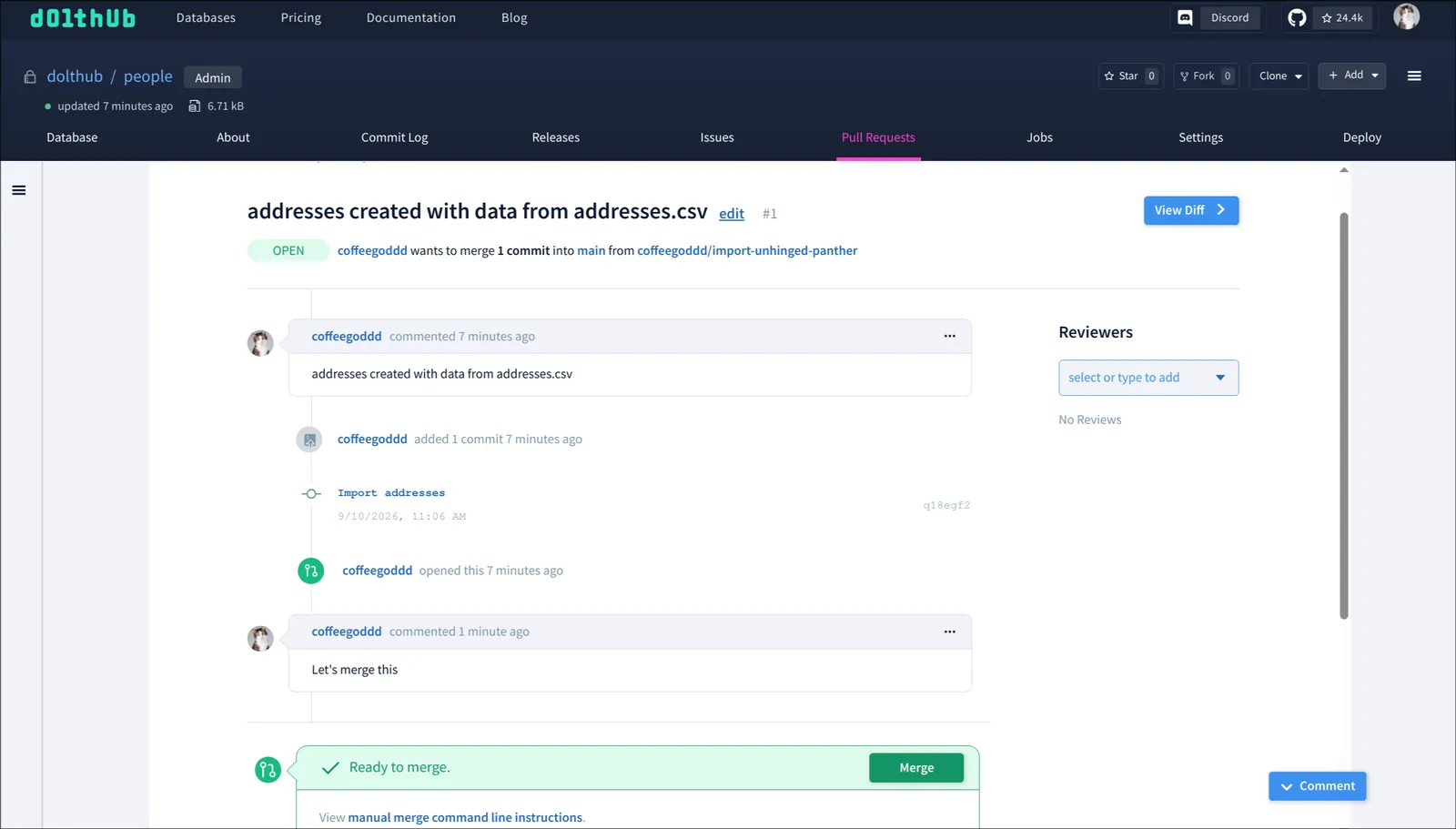
Okay, let’s merge it.
$ dh pr merge 1 --db OWNER/people➜ dolthub_cli git:(db/fix-output) ✗ dh pr merge 1 --db dolthub/people
Waiting for job 20685647-2f2d-4242-92d5-e62451caf0fe: succeeded
FIELD VALUE
ID 20685647-2f2d-4242-92d5-e62451caf0fe
Type merge
Status succeeded
Created 2026-09-10T18:23:52Z
Cancelable false
Error -
Result {"pull_id":1}If we view the pull request again, we can see the state has changed to merged.
➜  dolthub_cli git:(db/fix-output) ✗ dh pr view 1 --db dolthub/people
FIELD        VALUE
Title        addresses created with data from addresses.csv
State        merged
Author       coffeegoddd
Number       1
From         dolthub/people:coffeegoddd/import-unhinged-panther
Into         dolthub/people:main
Created      2026-09-10T18:06:22Z
Description addresses created with data from addresses.csvConclusion#
We are excited for both you and your agents to give dh a try. Today’s post was only a glimpse of its features. You can check out the full documentation for the tool to learn more.
If you encounter a bug or have a feature request, please open an issue on GitHub and let us know!