
Beads v1.0.1 is available now and is fully backed by Dolt to support the Classic Beads use-case, as well as the highly scalable use-case that underlies Gastown, Gas City, and the Wasteland, which launched in March.
The shift from earlier versions of Beads which were backed by a combination of SQLite and Git, to the exclusive Dolt backend has not been without friction for existing Beads users and we’ve seen many asking for clarification about what the current state of Beads is, how it works, and how they can use it effectively, to accomplish their goals.
In today’s post, I’ll cover the current state of Beads, and go through the common workflows Beads Classic supports, to help you more easily transition from old-world Beads to v1.0.1 and beyond. This post will only cover the use of Beads on its own; its use in Gastown, Gas City, and Wasteland is outside the scope of this blog.
The Single Agent, Single Project, Single Remote Workflow#
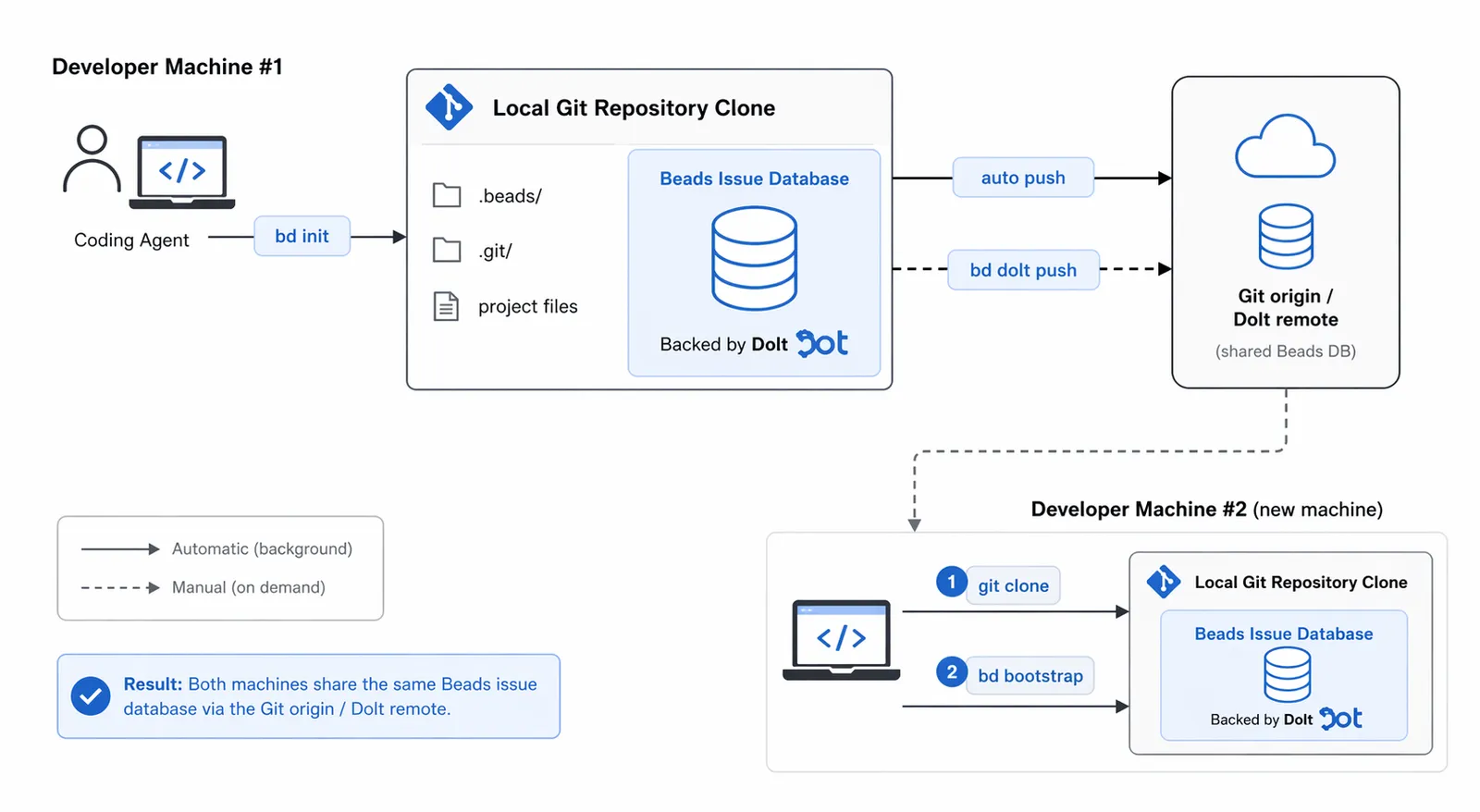
The first common workflow for Beads, which is supported by Beads’ default configuration, is using Beads with a single coding agent in a single Git repo. Out-of-the-box, Beads defaults to this mode, which aims to provide an experience as close to what veteran Beads users got when Beads ran on SQLite and Git alone, instead of Dolt.
Single-agent means that you do not plan to work with more than a single coding agent instance in this single Git repo, as opposed to running multiple instances of a coding agent like Claude Code to do work in parallel.
If this is the case, you can use the default mode of Beads without any additional configuration steps. In Beads v1.0.1, this mode will also use a single Dolt remote to remotely store your Beads alongside your code, by using the registered Git remote as the Beads Dolt database Dolt remote.
The benefit of using the Git remote as the Dolt remote is that it does not require extra credentialling, since Dolt can use your existing Git credentials and you’re not required to provision or create any other resource outside of your existing Git remote repository that exists on say GitHub or GitLab.
On earlier versions of Beads, Beads issues were stored in JSONL files and checked those into the Git repo. This also did not require further credentialling or remote provisioning, so we wanted to make the Beads Classic experience in v1.0.1 match this as closely as possible.
In v1.0.1, your Beads issues are no longer stored in the Git repo (at least in the way they used to be) and are no longer written to JSONL files by default, though this mode is still available for some use-cases.
All issues in Beads are mastered in a Dolt database, which is instantiated by Beads when you run bd init, although you will not see any local files change or see any Git commits related to Dolt in your history.
This is by design, although we know the opacity has caused some confusion for users, and we are doing everything we can to improve the transparency and experience for all users moving forward.
Additionally, when you change or checkout a Git branch in Beads Classic mode, you will not see different Beads issues on a different Dolt branch, the way you would when Beads used SQLite and Git.
In that old architecture, your Beads issues were always linked to your Git branch because the issues in JSONL format would be exported from SQLite and committed to Git. If you checked out a different Git branch, you checked out that branch’s committed Beads issues. Similarly, if you reset a Git commit, you reset your Beads issues.
Now, though, all Beads issues exist on Dolt’s main branch, regardless of your Git repo’s branch, the two are completely decoupled. At a later stage, we may add the ability to automatically correlate a Git branch with the exact same Dolt branch, restoring the original coupling Beads provided, but this is not implemented in Beads Classic today.
That said, even though you will no longer be Git committing Beads issues, your Beads Dolt database is still tracked by and travels with your Git repository. If you have a Git remote named origin defined in your local clone, Beads will automatically synchronize the Dolt database Beads uses for your repo to this Git remote. Because Dolt can also use Git remotes as its own, Beads will perform a dolt push to your registered Git remote automatically in the background from time to time. You can also manually sync to the Dolt remote by running the bd dolt push command.
Pushing means all of your Beads are preserved remotely alongside your code changes and can be easily restored, or cloned on command. It’s important to note though that this process is quite opaque to the Beads end user today, so you will not actually be able to visually see any changes on your Git remote, like GitHub, to know if your Beads Dolt database has been synced. You can read more about the technical aspects of Git remotes as Dolt remotes in our related blog.
For now, let’s go through an example together using this Beads classic, single-agent workflow to better clarify how you can use this mode yourself.
In the example below, I have a GitHub repo coffeegoddd/single_agent_repo that I’ve cloned locally.
➜  single_agent_example git:(main) gs
On branch main
nothing to commit, working tree clean
➜  single_agent_example git:(main) git remote -v
origin  https://github.com/coffeegoddd/single_agent_example.git (fetch)
origin  https://github.com/coffeegoddd/single_agent_example.git (push)
This project has not been initialized with Beads, yet, so let’s do that now. Because I plan to only work with a single coding-agent instance on this project, I can use default Beads, and simply run bd init to initialize Beads.
➜  single_agent_example git:(main) bd init
  ✓ Configured Dolt remote: origin → git+https://github.com/coffeegoddd/single_agent_example.git
  Repository ID: 8e91b717
  Clone ID: 2b0f89f1f4b6967b
Contributing to someone else's repo? [y/N]:
Beads has a mode for contributing to an external repository and prompts me for this, but since this is my own project, I will answer “no”.
The line above specifies that this Beads project will use my project’s Git remote as its Dolt remote, meaning it will push the Dolt database containing all of my Beads issues, to this remote. Again, at this time, this work will be invisible on GitHub. Note: we have an issue tracking improvements here pending design, scoping and review.
Following this prompt you will see some output like the following:
✓ bd initialized successfully!

  Backend: dolt
  Mode: embedded
  Database: single_agent_example
  Issue prefix: single_agent_example
  Issues will be named: single_agent_example-<hash> (e.g., single_agent_example-a3f2dd)
You are now able to start using your coding agent with Beads in this project.
Let’s make two example issues in our project.
➜  single_agent_example git:(main) bd create "this is my first issue" --description "issue one"
✓ Created issue: single_agent_example-533 — this is my first issue
  Priority: P2
  Status: open

➜  single_agent_example git:(main) bd create "this is my second issue" --description "issue two"
✓ Created issue: single_agent_example-060 — this is my second issue
  Priority: P2
  Status: open
➜  single_agent_example git:(main) bd list
○ single_agent_example-060 ● P2 this is my second issue
○ single_agent_example-533 ● P2 this is my first issue

--------------------------------------------------------------------------------
Total: 2 issues (2 open, 0 in progress)

Status: ○ open  ◐ in_progress  ● blocked  ✓ closed  ❄ deferred
These issues are persisted in Beads’ Dolt database and have been synced to GitHub automatically, because I have the origin remote defined in my local clone.
Though invisible on GitHub, I can clone my Beads Dolt database simply by supplying the GitHub URL of this project.
➜  dbs git:(main) ✗ dolt clone https://github.com/coffeegoddd/single_agent_example.git
cloning git+https://github.com/coffeegoddd/single_agent_example.git
85 of 85 chunks complete.
➜  dbs git:(main) ✗ cd single_agent_example
➜  single_agent_example git:(main) ✗ dolt sql -q "select id from issues;"
+--------------------------+
| id                       |
+--------------------------+
| single_agent_example-060 |
| single_agent_example-533 |
+--------------------------+
Imagine I want to move my work to a different machine, where I continue to use a single coding agent on this project. To do so, I simply need to clone the GitHub project like normal and run bd bootstrap, instead of bd init which creates a new Beads database. This will ensure my existing Beads Dolt database is cloned and ready to use.
➜  cursor_src git:(main) ✗ git clone https://github.com/coffeegoddd/single_agent_example.git sae_clone
Cloning into 'sae_clone'...
remote: Enumerating objects: 3, done.
remote: Counting objects: 100% (3/3), done.
remote: Total 3 (delta 0), reused 3 (delta 0), pack-reused 0 (from 0)
Receiving objects: 100% (3/3), done.
➜  cursor_src git:(main) ✗ cd sae_clone
➜  sae_clone git:(main) bd bootstrap
Bootstrap plan: clone from remote
  Remote: git+https://github.com/coffeegoddd/single_agent_example.git
  Database: beads
Proceed? [Y/n]
Beads will confirm with me that I want to clone the existing Beads Dolt database to this new workspace. I select “yes” and I’m ready to go.
➜  cursor_src git:(main) ✗ git clone https://github.com/coffeegoddd/single_agent_example.git sae_clone
Cloning into 'sae_clone'...
remote: Enumerating objects: 3, done.
remote: Counting objects: 100% (3/3), done.
remote: Total 3 (delta 0), reused 3 (delta 0), pack-reused 0 (from 0)
Receiving objects: 100% (3/3), done.
➜  cursor_src git:(main) ✗ cd sae_clone
➜  sae_clone git:(main) bd bootstrap
Bootstrap plan: clone from remote
  Remote: git+https://github.com/coffeegoddd/single_agent_example.git
  Database: beads
Proceed? [Y/n] Y
85 of 85 chunks complete.
Synced database from git+https://github.com/coffeegoddd/single_agent_example.git
➜  sae_clone git:(main) ✗ bd list
○ single_agent_example-060 ● P2 this is my second issue
○ single_agent_example-533 ● P2 this is my first issue

--------------------------------------------------------------------------------
Total: 2 issues (2 open, 0 in progress)

Status: ○ open  ◐ in_progress  ● blocked  ✓ closed  ❄ deferred
The Multiple Agent, Multiple Clone, Single Remote Workflow#
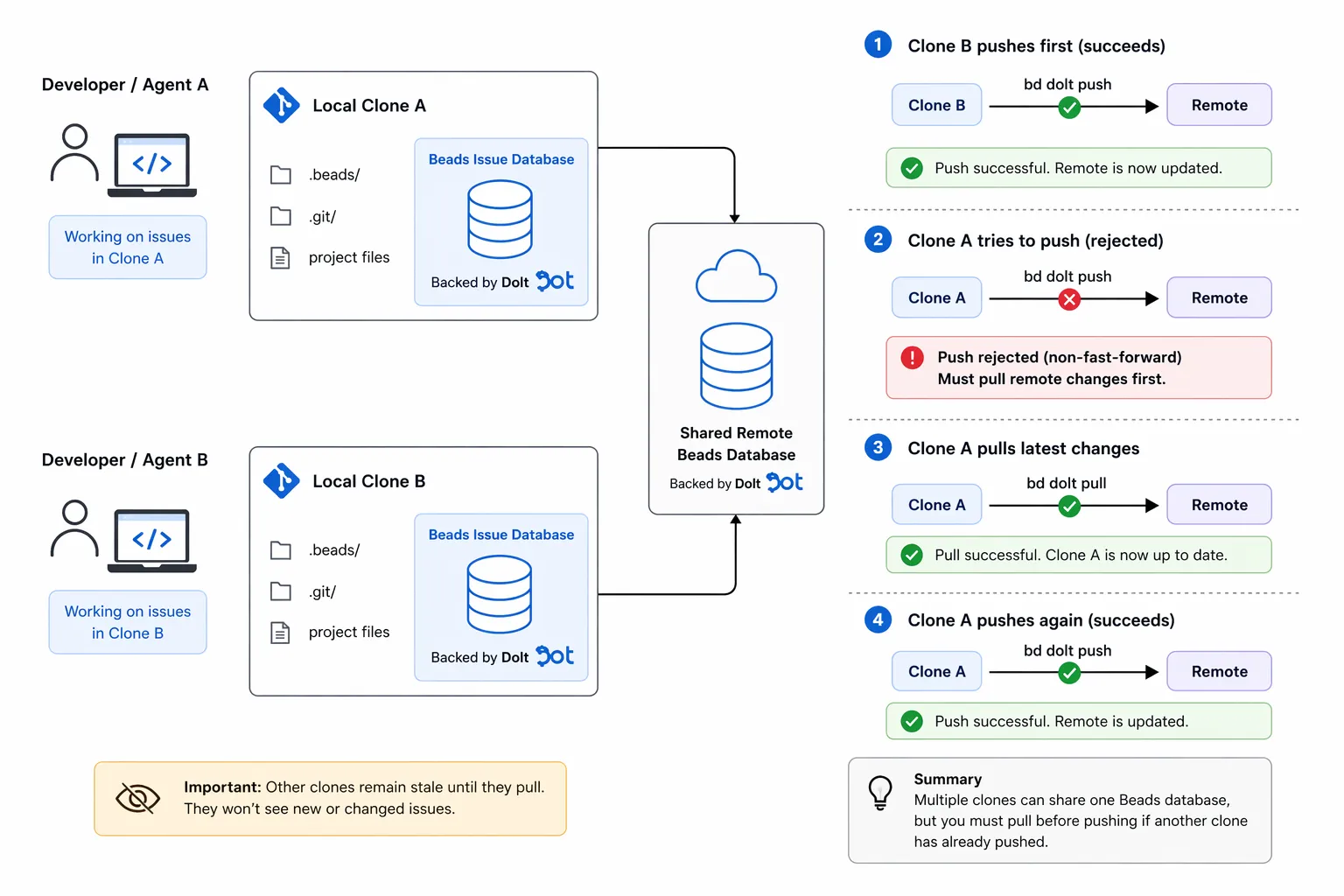
Another common workflow we see with Beads is running multiple coding agents with each one its own clone of the source code to work on.
The benefit of this approach is that it allows for parallel work and shared Beads across that work, but there is a downside of doing this with a single remote, here meaning a single Dolt remote.
As shown in the earlier example, by default Beads will use the registered origin Git remote as the Dolt remote, and this will continue to be true for all clones of this Git repository. This works well for the single-agent, single-project workflow but adds complexity when adding more parallel agents.
Because every Git clone will have the same origin remote, each one will also share the same Beads Dolt remote database. The fundamental model is one-to-one: one Git clone is one Beads Dolt database.
As a result, writes from these clones will need to be synchronized on the singular Dolt remote, which adds some extra steps in the workflow and has the potential to introduce merge conflicts if multiple agents working on different clones modify the same Beads issues and then try to push them.
Git works this way too. If two developers working on two clones of the source code modify the same lines in a file and push to GitHub, this will create merge conflicts that need to be resolved before both are accepted by the remote.
Here’s a walkthrough of this setup in action, showing how you can use it effectively despite the nuances.
I’ll be using a new GitHub repo, coffeegoddd/multi_clone_example.
First I’ll initialize Beads in Classic mode with bd init.
➜  multi_clone_example git:(main) gs
On branch main
Your branch is up to date with 'origin/main'.

nothing to commit, working tree clean
➜  multi_clone_example git:(main) bd init
  ✓ Configured Dolt remote: origin → git+https://github.com/coffeegoddd/multi_clone_example.git
  ...
  ✓ bd initialized successfully!

  Backend: dolt
  Mode: embedded
  Database: multi_clone_example
  Issue prefix: multi_clone_example
  Issues will be named: multi_clone_example-<hash> (e.g., multi_clone_example-a3f2dd)
I’ve initialized Beads in this Git repo, and this single clone is ready for one coding agent to use, but I need to set up clones of this repo for parallel agents to work on.
To do this, first I must Git push, which will push the latest Git commit back to GitHub. Beads committed the .beads directory to my project, and this will need to be available in the Git clones.
➜  multi_clone_example git:(main) git log -n 1
➜  multi_clone_example git:(main) gpush origin main
Enumerating objects: 19, done.
Counting objects: 100% (19/19), done.
Delta compression using up to 16 threads
Compressing objects: 100% (12/12), done.
Writing objects: 100% (18/18), 6.32 KiB | 6.32 MiB/s, done.
Total 18 (delta 5), reused 14 (delta 5), pack-reused 0 (from 0)
remote: Resolving deltas: 100% (5/5), done.
To https://github.com/coffeegoddd/multi_clone_example.git
   508be20..1067aea  main -> main
➜  multi_clone_example git:(main)
And second, I need to run bd dolt push manually to make sure the remote Dolt database is created, so that my subsequent Git clones will use this same remote Dolt database, instead of trying to create a new one with an unrelated history.
➜  multi_clone_example git:(main) bd dolt push
Pushing to Dolt remote...
Push complete.

➜  multi_clone_example git:(main)
Now that the first clone has properly configured the remotes, I can clone this Git repo multiple times, for my agents to work on.
I’ll start by performing the clones.
➜  cursor_src git:(main) ✗ git clone https://github.com/coffeegoddd/multi_clone_example.git mce_clone_a
Cloning into 'mce_clone_a'...
remote: Enumerating objects: 21, done.
remote: Counting objects: 100% (21/21), done.
remote: Compressing objects: 100% (13/13), done.
remote: Total 21 (delta 5), reused 21 (delta 5), pack-reused 0 (from 0)
Receiving objects: 100% (21/21), 6.53 KiB | 6.53 MiB/s, done.
Resolving deltas: 100% (5/5), done.
➜  cursor_src git:(main) ✗ git clone https://github.com/coffeegoddd/multi_clone_example.git mce_clone_b
Cloning into 'mce_clone_b'...
remote: Enumerating objects: 21, done.
remote: Counting objects: 100% (21/21), done.
remote: Compressing objects: 100% (13/13), done.
remote: Total 21 (delta 5), reused 21 (delta 5), pack-reused 0 (from 0)
Receiving objects: 100% (21/21), 6.53 KiB | 6.53 MiB/s, done.
Resolving deltas: 100% (5/5), done.
Next I’ll cd into each clone and run the bd bootstrap command, which will ensure both use the same remote Beads Dolt database as my original clone.
➜  cursor_src git:(main) ✗ cd mce_clone_a
➜  mce_clone_a git:(main) bd bootstrap
Bootstrap plan: clone from remote
  Remote: git+https://github.com/coffeegoddd/multi_clone_example.git
  Database: multi_clone_example
Proceed? [Y/n] Y
70 of 70 chunks complete.
Synced database from git+https://github.com/coffeegoddd/multi_clone_example.git
➜  mce_clone_a git:(main) cd ../mce_clone_b
➜  mce_clone_b git:(main) bd bootstrap
Bootstrap plan: clone from remote
  Remote: git+https://github.com/coffeegoddd/multi_clone_example.git
  Database: multi_clone_example
Proceed? [Y/n] Y
70 of 70 chunks complete.
Synced database from git+https://github.com/coffeegoddd/multi_clone_example.git
At this point, all clones are in sync remotely, and work can begin. When it comes time for a push to the remote though, if one agent advanced the remote database HEAD, subsequent pushes from other agents will fail with an error telling them that they will first need to pull (bd dolt pull) the remote changes locally first, and then retry the push. This is expected and is how the remote state stays synchronized.
Let’s say in my clone of multi_clone_example, mce_clone_b, I create a new Beads issue and it is pushed to the remote.
➜  mce_clone_b git:(main) bd create "this is an issue from clone b" --description "issue from b"
✓ Created issue: multi_clone_example-1g6 — this is an issue from clone b
  Priority: P2
  Status: open

💡 Tip: Install the beads plugin for automatic workflow context, or run 'bd setup claude' for CLI-only mode
Meanwhile, mce_clone_a has its own Beads issue it wants to create and push, but it has not yet seen the issue created by mce_clone_b. The agent working with this clone will see the expected error.
➜  mce_clone_a git:(main) bd create "this is an issue from clone a" --description "issue from a"
✓ Created issue: multi_clone_example-1fb — this is an issue from clone a
  Priority: P2
  Status: open

Warning: dolt auto-push failed: push to origin/main: Error 1105: To git+https://github.com/coffeegoddd/multi_clone_example.git
 ! [rejected]            main -> main (non-fast-forward)
error: failed to push some refs to 'git+https://github.com/coffeegoddd/multi_clone_example.git'
hint: Updates were rejected because the tip of your current branch is behind
hint: its remote counterpart. Integrate the remote changes (e.g.
hint: 'dolt pull ...') before pushing again.
The resulting error explains that the remote changes must first be pulled, before this agent’s push can succeed. The issue was created successfully locally though, no data was lost.
➜  mce_clone_a git:(main) bd list
○ multi_clone_example-1fb ● P2 this is an issue from clone a

--------------------------------------------------------------------------------
Total: 1 issues (1 open, 0 in progress)

Status: ○ open  ◐ in_progress  ● blocked  ✓ closed  ❄ deferred
To resolve this, the agent working in mce_clone_a must run bd dolt pull, and then bd dolt push again, assuming there are no merge conflicts to resolve.
➜  mce_clone_a git:(main) bd dolt pull
Pulling from Dolt remote...
Pull complete.
➜  mce_clone_a git:(main) bd dolt push
Pushing to Dolt remote...
Push complete.
➜  mce_clone_a git:(main)
This time the push succeeds. This is the extra complexity described earlier that comes from sharing a single remote, but it’s necessary for synchronizing Beads across clones of the same Git repository.
If we return to the original clone of multi_clone_example and run bd list, you’ll notice it does not reflect the latest issues.
➜  multi_clone_example git:(main) bd list
No issues found.
Its local state is still behind the remote, so bd dolt pull needs to be run to pull the latest remote state locally.
➜  mce_clone_a git:(main) cd ../multi_clone_example
➜  multi_clone_example git:(main) bd list
No issues found.
➜  multi_clone_example git:(main) bd dolt pull
Pulling from Dolt remote...
Pull complete.

➜  multi_clone_example git:(main) bd list
○ multi_clone_example-1fb ● P2 this is an issue from clone a
○ multi_clone_example-1g6 ● P2 this is an issue from clone b

--------------------------------------------------------------------------------
Total: 2 issues (2 open, 0 in progress)

Status: ○ open  ◐ in_progress  ● blocked  ✓ closed  ❄ deferred
➜  multi_clone_example git:(main)
Though not currently implemented, we may add automatic pull on read to Beads to make this process a bit more seamless.
The Multiple Agent, Multiple Clone, Multiple Remote Workflow#
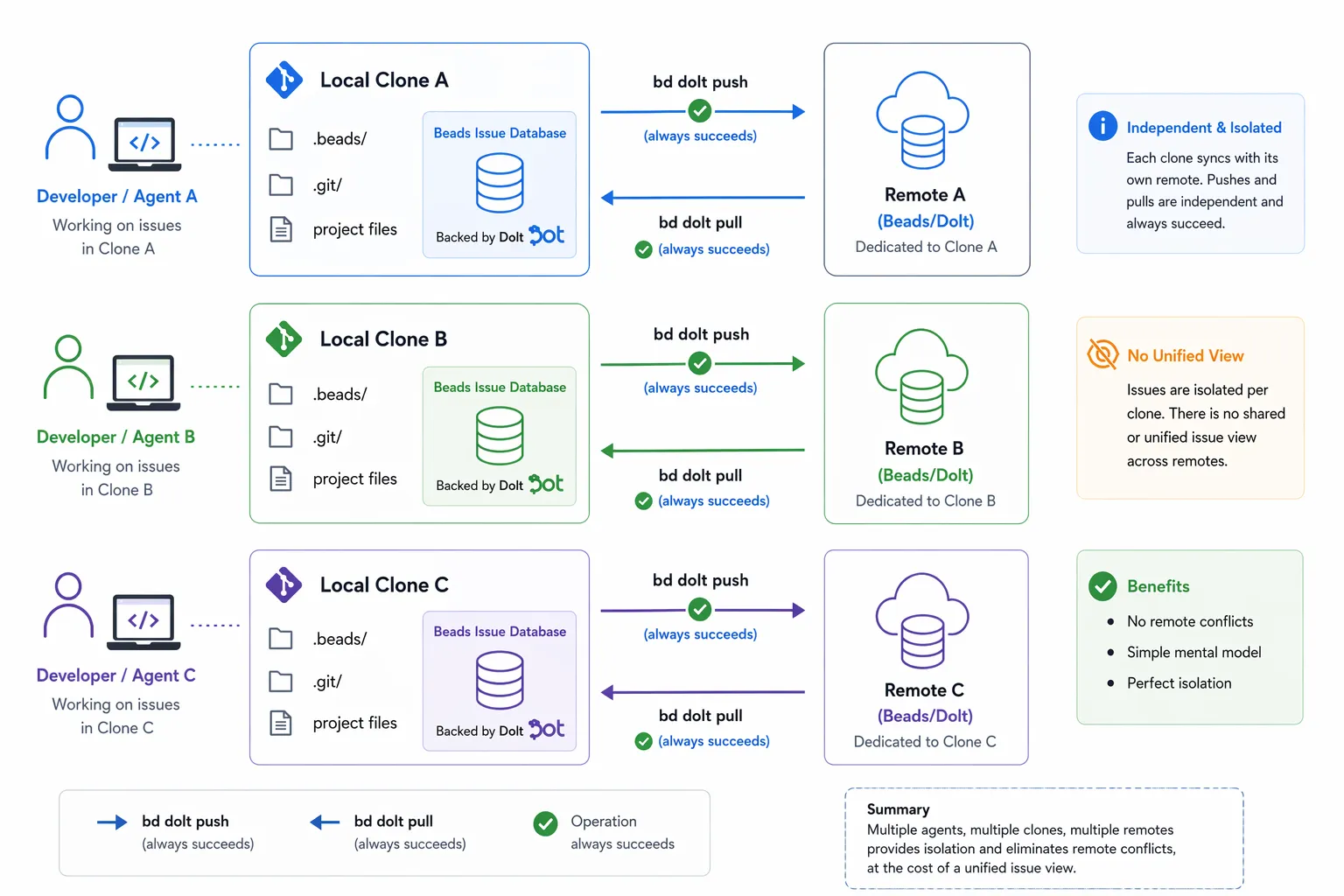
In contrast to the previous approach which traded off added complexity in order to share Beads across Git clones but required synchronized remote writes, this one simply uses separate Dolt remotes for each Git clone.
This enables multiple agents to work in parallel across many clones of the same source, but each clone has a dedicated Beads Dolt database and corresponding remote, as opposed to one remote for many clones.
There are no merge conflicts to worry about here, since each Beads Dolt database gets its own clone and coding agent. Pushes and pulls should always succeed without error.
The only extra setup this approach requires is provisioning and configuring a separate Dolt remote for each of the clones. Unfortunately, for this configuration, the default Git origin remote cannot be used as the Dolt remote since this origin will be identical across the clones.
Instead, any other valid Dolt remote can be used. In this example, I’ll use a DoltHub remote for each clone.
To start, I’ll need an account on DoltHub.com, and I’ll need to create a database on DoltHub for every clone of my source code I plan to maintain.
I’ll need three: one for multi_clone_example, one for mce_clone_a, and one for mce_clone_b.
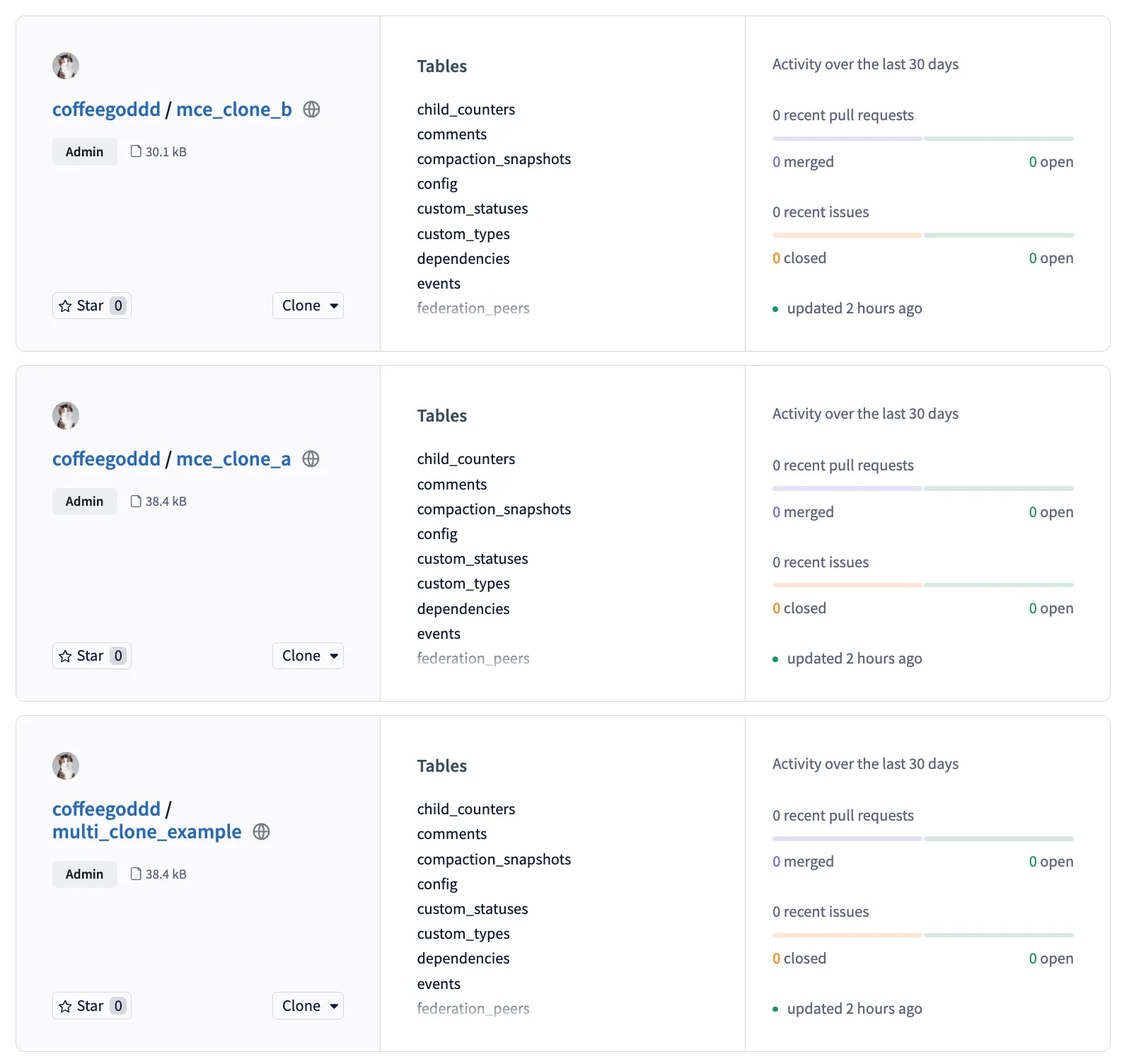
Next, I can take the remote URL of each database displayed on DoltHub and change the Beads Dolt remote for each of my clones. This will ensure they start using separate remote databases, instead of a shared one.
➜  multi_clone_example git:(main) bd dolt remote remove origin
Removed remote "origin" (SQL + CLI)
➜  multi_clone_example git:(main) bd dolt remote add origin coffeegoddd/multi_clone_example
Added remote "origin" → coffeegoddd/multi_clone_example (SQL + CLI)
➜  multi_clone_example git:(main) bd dolt push
Pushing to Dolt remote...
Push complete.
After the push, my Beads Dolt database will be up to date on DoltHub.com for me to visually inspect.
I can then do this same process for the clones.
➜  multi_clone_example git:(main) cd ../mce_clone_a
➜  mce_clone_a git:(main) bd dolt remote remove origin
Removed remote "origin" (SQL + CLI)
➜  mce_clone_a git:(main) bd dolt remote add origin coffeegoddd/mce_clone_a
Added remote "origin" → coffeegoddd/mce_clone_a (SQL + CLI)
➜  mce_clone_a git:(main) bd dolt push
Pushing to Dolt remote...
Push complete.
➜ mce_clone_a git:(main) cd ../mce_clone_b
➜ mce_clone_b git:(main) bd dolt remote remove origin
Removed remote "origin" (SQL + CLI)
➜ mce_clone_b git:(main) bd dolt remote add origin coffeegoddd/mce_clone_b
Added remote "origin" → coffeegoddd/mce_clone_b (SQL + CLI)
➜ mce_clone_b git:(main) bd dolt push
Pushing to Dolt remote...
Push complete.This setup is now complete, and ready for multiple agents to work in parallel.
The tradeoff here is visibility. Because each clone has its own Dolt remote, there’s no single place where all Beads issues live. If an agent working in mce_clone_a creates an issue, the agents in mce_clone_b and multi_clone_example will never see it unless you manually consolidate them.
For many teams this is fine, especially when each clone represents an independent workstream where the agents don’t need to coordinate on shared issues. But if you need a unified view of all issues across your clones, the single remote workflow from the previous section is the better fit, even with the added push/pull overhead.
Conclusion#
If you’re not sure which workflow to pick, start with the single-agent, single-remote setup. It requires no extra configuration and covers the most common use-case. When you outgrow it and need parallel agents, you can decide whether shared visibility or independent workstreams matter more to you and choose between the single remote and multiple remote workflows accordingly.
We’re actively working on reducing the friction in all of these workflows. Automatic pull on read, better visibility into remote sync status, and Git branch to Dolt branch correlation are all on our radar. If you run into issues or have feedback, check out the GitHub repo and join our Discord — we’d love to hear from you.