
Dolt is the world’s first version-controlled SQL database. We like to say that MySQL and Git had a baby. Dolt is a distributed database which supports the clone/push/pull model of Git. This means that you can clone a Dolt database, make changes to it, and then push those changes back to the original database.
There are a variety of remote types that we support. The default is the DoltHub model, which was our original transport. We recently added support for Git remotes, which allow you to push and pull from Git repositories, such as GitHub. We have a variety of remote types, and today, we’re excited to announce support for SSH remotes!
TL;DR;#
To add a new remote, run:
dolt remote add ssh-remote ssh://user@host/path/to/database/.doltThen you can push and pull from that remote:
dolt fetch ssh-remote
dolt merge ssh-remote/main
dolt push ssh-remote HEAD:main
Want to know more? Keep reading!
A Little Background#
Dolt’s history is somewhat winding. The first effort was to be a data-sharing platform. It was Git for tabular data, pushed and pulled to dolthub.com. That first step required us to define the push and pull protocols for Dolt pretty early, and we optimized for pushing to DoltHub.
The protocol ended up being stateless and depends on the client using gRPC and HTTP GET/POST for all operations. The gRPC side of the protocol covers getting details about the database, such as what branches exist and what commits are on their HEADs. It also handles finalizing updates at the end of a push. The HTTP side of the protocol covers downloading and uploading Dolt storage files.
The two sides are tightly connected. The gRPC server, through back-and-forth with the client, builds a list of storage files the client needs to download. Then the client downloads those files over HTTP. This even includes downloading specific byte ranges of the storage files to avoid downloading data the client already has. Furthermore, the gRPC server may generate temporary storage links for S3, GCS, or Azure, and the client can download those files directly from the cloud provider. It all serves to make a highly scalable system that doesn’t rely on long-lived connections or a lot of server state.
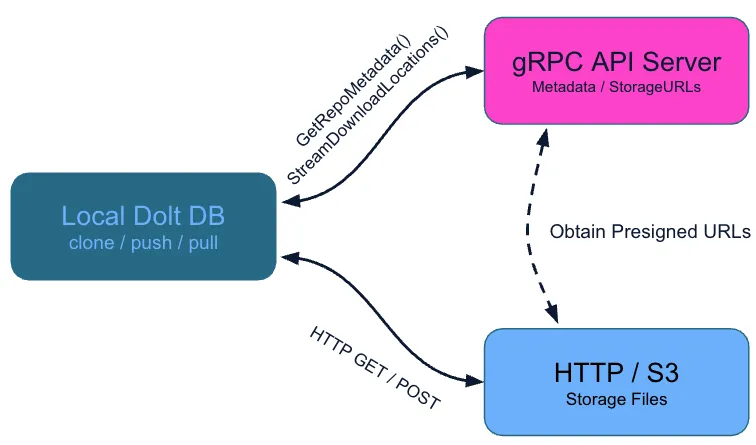
This model has served us well. The main thing to take away is that the client actually speaks two transport protocols to two different servers. The gRPC server is the one that understands the Dolt protocol, and the HTTP server is just a file server.
SSH Remotes#
SSH remote support was actually requested a long time ago in the COVID days of 2020. So long ago that the original requester has since canceled their GitHub account. Sorry ghost user! We finally got around to it, and we’re excited to announce that you can now use SSH remotes with Dolt!
In Git’s history, SSH remotes were the first remote type supported. The way Git works over SSH today is through two lesser-known Git commands: git-upload-pack and git-receive-pack. When you do a git fetch or git pull, Git will run git-upload-pack on the remote server, which will generate the pack file of the objects that need to be sent to the client. When you do a git push, Git will run git-receive-pack on the remote server, which will receive the pack files from the client and update the remote repository.
Git operations over SSH are ultimately two processes talking over their stdin and stdout byte streams. A fundamentally UNIX-y way to do things.

With release 1.83.6 of Dolt, we have adopted a similar model. We’ve introduced a new command, dolt transfer:
$ dolt transfer --help
NAME
        dolt transfer - Internal command for SSH remote operations

DESCRIPTION
        The transfer command is used internally by Dolt for SSH remote operations.
        It serves repository data over stdin/stdout using multiplexed gRPC and HTTP
        protocols.

        This command is typically invoked by SSH when cloning or pushing to SSH
        remotes:
          ssh user@host "dolt --data-dir /path/to/repo transfer"

        The transfer command:
          - Loads the Dolt database at the specified path
          - Starts a gRPC server for chunk store operations
          - Starts an HTTP server for table file transfers
          - Multiplexes both protocols over stdin/stdout using SMUX

        This is a low-level command not intended for direct use.
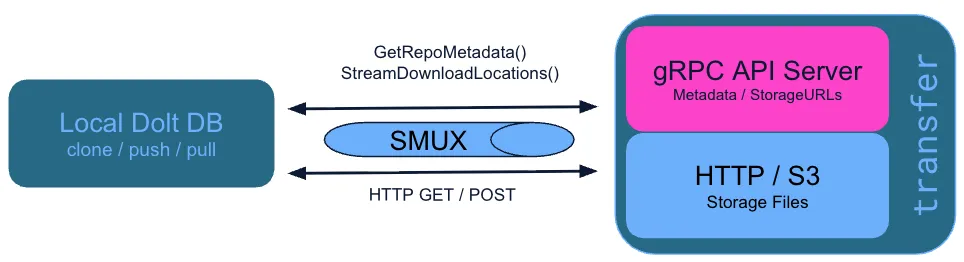
The dolt transfer command is the server side of the SSH remote protocol. It fulfills the purpose of both git-upload-pack and git-receive-pack at the same time. Over any binary pipe, it serves both the gRPC and HTTP protocols using an HTTP multiplexing library called SMUX. The client side of the SSH remote protocol is built into the existing dolt fetch, dolt pull, and dolt push commands of release 1.83.6. When you run one of those commands with an SSH remote, the client will connect to the remote server over SSH, run the dolt transfer command, and then engage in the same gRPC/HTTP dialog as it would with any remote.
The reason for doing it this way is that Dolt’s protocol has been oiled and optimized in the years since we first released it. Using the existing protocol is the prudent way to ensure that we have a reliable way to move data over any transport. Honor those that came before you, and all that.
The picture above, where traffic flows between a gRPC server and an HTTP server, still holds. In DoltHub’s case, the stateless gRPC server can have any number of instances and the HTTP server is just S3. This is a very scalable topology. But dolt transfer takes a different approach. It runs both servers in one process and multiplexes the two protocols over the binary streams of UNIX pipes.
End-to-End Example#
Showing an end-to-end example of using SSH remotes is a bit tricky. You need to have an SSH server running somewhere with Dolt installed. If you have that, then you can follow along with the example below. Running your own SSHD server in user space is possible, but I don’t want to give any hand-wavy solutions that are going to open up your system to attackers. On a macOS host, you can enable SSH in System Settings by searching for “Remote Login.” Now I’ve said too much. If you want to run your own SSHD server, I recommend that you familiarize yourself with the SSHD documentation and best practices before doing so.
For the sake of this example, we’ll assume that you have an SSH server running on pat.host.example with a user pat, and that you have a Dolt database at /home/pat/database/.dolt on that server. We’ll also assume that you have SSH access to that server from your local machine. You can verify that by running:
ssh pat@pat.host.exampleIf you can log in successfully, then you should be able to use SSH remotes with Dolt. Ideally, you should also have passwordless SSH set up with a key pair, but that’s not strictly necessary. If you have trouble authenticating, you can increase the verbosity of the SSH client to get more information about what’s going wrong:
ssh -vvv pat@pat.host.exampleOnce you have SSH access, you can clone the remote database using the dolt clone command with the SSH URL of the remote database:
dolt clone ssh://pat@pat.host.example/home/pat/database/.doltThis will clone the database into a new directory called database in your current working directory. You can also specify a different directory name, my-local-database, if you want:
dolt clone ssh://pat@pat.host.example/home/pat/database/.dolt my-local-databaseNow you have a local copy of the database, and you can make changes to it. When you’re ready to push those changes back to the remote, you can run:
cd my-local-database
dolt commit --allow-empty -m "This is a No-Op commit to test SSH remotes"
dolt push origin main
There you have it! You’ve successfully cloned a database and pushed changes via an SSH remote. You can also pull from the remote to get any changes that have been made on the remote since you last fetched:
dolt pullSome Extra Levers#
One of the strengths of SSH remotes in Git, and now Dolt, is that you can override the SSH command that is used to connect to the remote server. This allows you to do things like specify a custom port, use a different SSH key, or even use a completely different SSH client. It is not uncommon for security-conscious organizations to use bastion hosts for SSH access, and this feature allows you to easily connect to those hosts.
There are two new environment variables that you can set to override the SSH command that is used by Dolt:
| Variable | Description | Default |
|---|---|---|
DOLT_SSH_COMMAND | SSH command and arguments to use for connecting. Mirrors Git’s GIT_SSH_COMMAND. | ssh |
DOLT_SSH_EXEC_PATH | Path to the dolt binary on the remote host. | dolt |
The first allows you to do things like specify a non-default key:
DOLT_SSH_COMMAND="ssh -i /path/to/key" dolt clone ssh://user@host/path/to/database/.doltThe second allows you to specify a different path to the dolt binary on the remote host. This is most useful if you don’t control your SSH daemon instance and dolt is not in your system path. On such a system, you could build from source and put it in your personal home directory, and then set DOLT_SSH_EXEC_PATH to point to that binary:
DOLT_SSH_EXEC_PATH="/home/neil/bin/dolt" dolt clone ssh://user@host/path/to/database/.doltSSH is a remarkably flexible tool, and it can be dangerous when used incorrectly, especially if you are considering running your own SSH daemon and allowing others to connect to it. We recommend that you familiarize yourself with the SSH documentation and best practices before using SSH remotes with Dolt beyond your individual use.
Conclusion#
Moving data around is fundamental to Dolt, and we’re excited to add another tool to the toolbox for doing that. There are improvements we can make, such as branch-specific configuration for your SSH connections. But we’d like to hear from our users about how you plan to use SSH remotes and what features you’d like to see in the future.
Come to our Discord to let us know what you build with this new feature or if you have any questions or feedback!