
We recently launched agent mode in the Dolt Workbench. It works a lot like Cursor, but for SQL workbenches instead of IDEs.
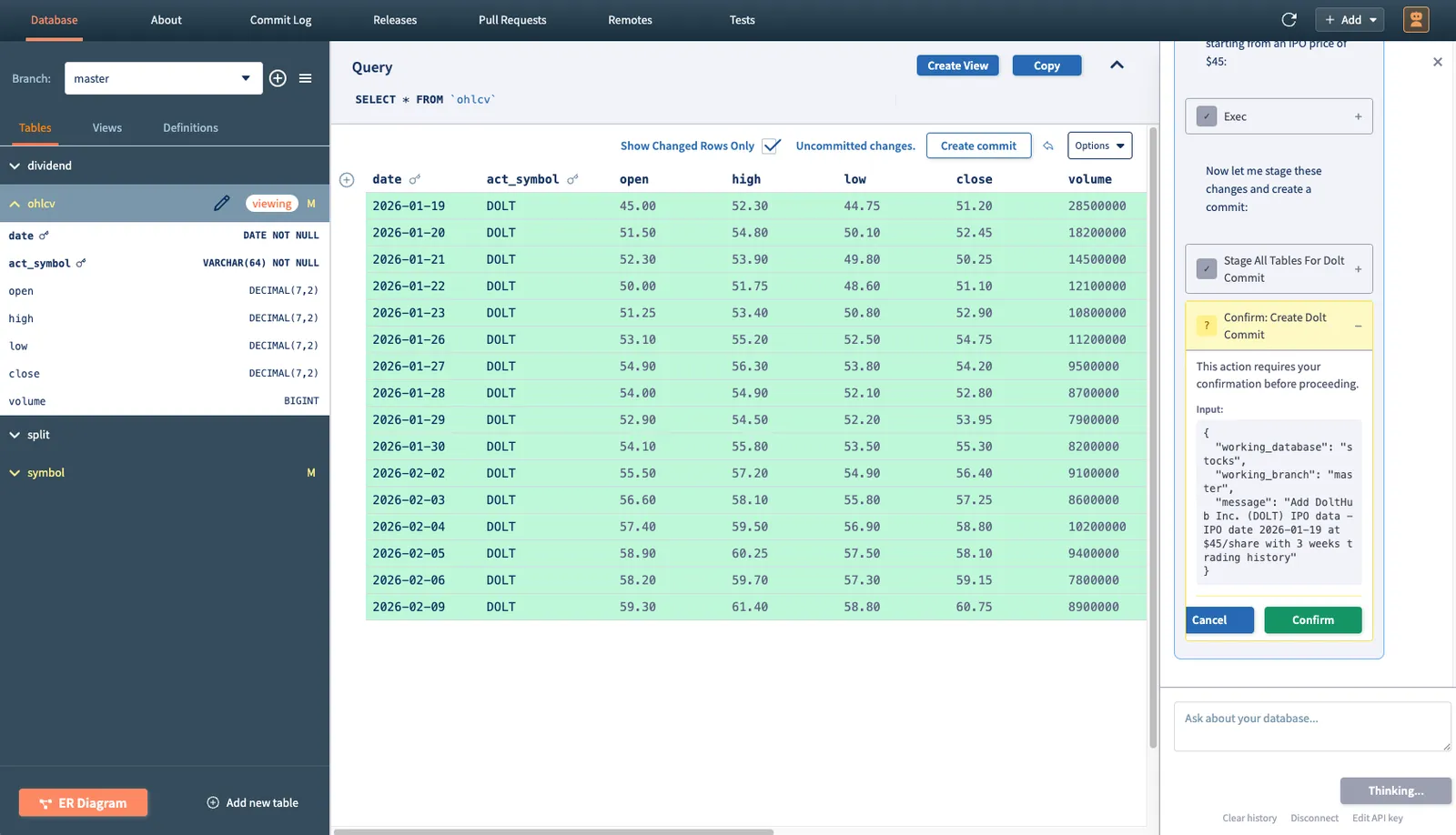
If you’re interested in trying it out, the workbench is available for download here or on the Mac and Windows app stores.
I wrote a blog a few weeks ago discussing the Claude Agent SDK and how we used it to build agent mode in the workbench. One feature of the SDK that I didn’t touch on and haven’t seen much discussion about online is the ability to embed custom tools directly in your application. This is quietly powerful and enables your agent to directly modify application state. This article will discuss what that means for agentic applications and how we utilize it for the workbench.
Types of Tools#
According to the Claude Agent SDK documentation, there are two types of tools:
- Client tools: Tools that execute on your systems, which include:
- User-defined custom tools that you create and implement
- Anthropic-defined tools like computer use and text editor
- Server tools: Tools that execute on Anthropic’s servers, like the web search and web fetch tools. These tools must be specified in the API request but don’t require implementation on your part.
The category we’re interested in for this article is user-defined client tools. In most examples, this means building a custom MCP server that exposes operations over some external system, such as a database, a file system, an API, etc. These tools act as structured bridges between the model and external resources. Dolt Workbench, for instance, makes heavy use of the Dolt MCP Server for all Dolt-related database operations.
But there’s another pattern that also falls into this category: defining tools that operate entirely within your application boundary. The agent SDK allows you to create in-process MCP servers with tool definitions that live directly inside your application code. Let’s look at an example:
The Switch Branch Tool#
Virtually all tools defined by the Dolt MCP server come with a working_branch argument. This is necessary because it allows MCP tool calls to remain stateless (i.e. the MCP server itself doesn’t have to keep track of the branch that an agent should be working on for the current session), and it also means that the agent can do work on branches other than the one the user is actively connected to. The agent can simply pass the appropriate branch into the tool call and the operation will take place on that branch.
Since the MCP server has a separate database connection open, it can’t actually switch or checkout branches on behalf of the user. However, this was still a capability we wanted the agent to have. So, to support it, we defined a custom tool in the workbench code that actually switches branches inside the workbench.
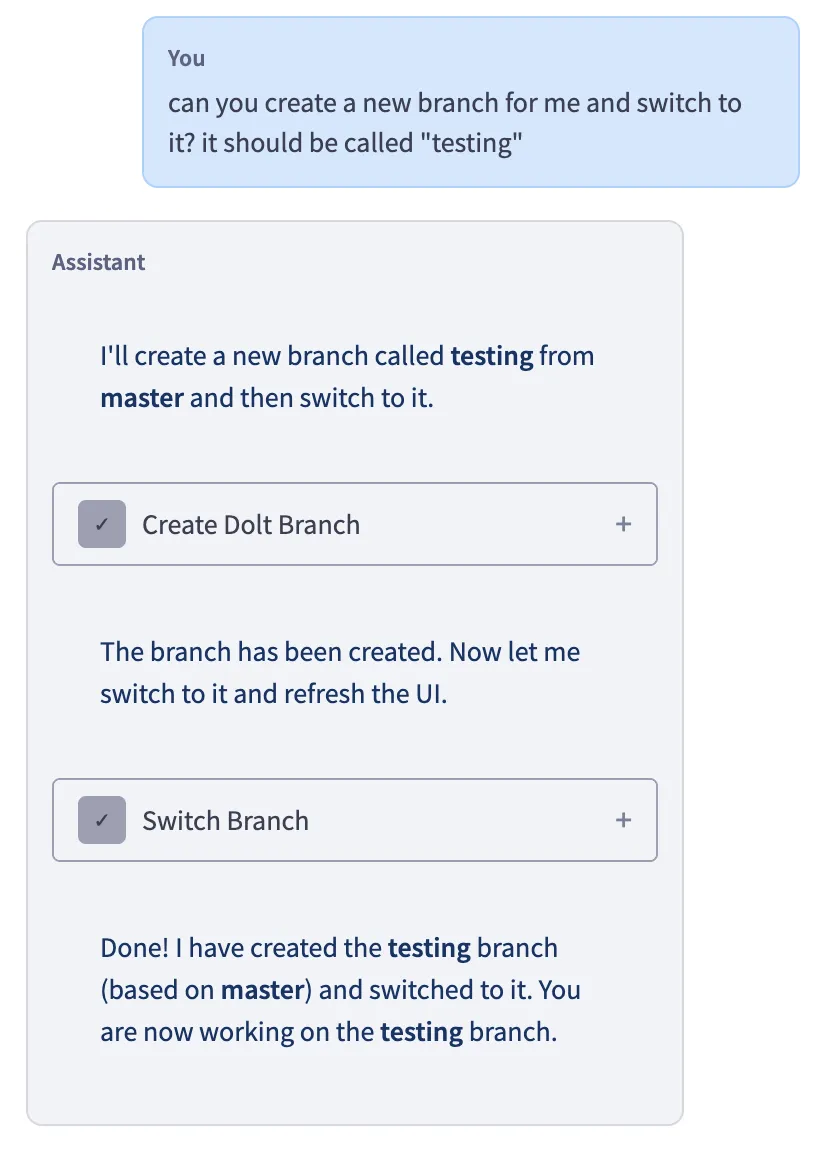
This hooks into the exact same branch-switching machinery that the workbench uses when a user switches branches from the UI. This immediately causes a visual re-render and points the workbench’s internal state at the new branch. Let’s see how it works.
Implementation#
We’re making use of two SDK functions here: tool() and createSdkMcpServer().
private createWorkbenchMcpServer() {
    const switchBranchTool = tool(
      "switch_branch",
      "Switch to a different branch in the workbench. This will navigate the UI to show the selected branch.",
      {
        branch_name: z.string().describe("The name of the branch to switch to"),
      },
      async args => {
        this.sendEvent("agent:switch-branch", { branchName: args.branch_name });
        return {
          content: [
            {
              type: "text" as const,
              text: `Successfully switched to branch: ${args.branch_name}`,
            },
          ],
        };
      },
    );
    return createSdkMcpServer({
      name: "workbench",
      version: "1.0.0",
      tools: [switchBranchTool],
    });
}
The tool function is what you use to define these special in-process tools. You give it a name, description, and callback function with arguments. In this case, we’re passing the branch name and then sending an IPC event to Electron’s renderer process. This special type of event is registered here:
onAgentSwitchBranch: (callback: (event: { branchName: string }) => void) =>
    ipcRenderer.on("agent:switch-branch", (_event, value) => callback(value)),
Then, in the UI layer, we set up an event listener on the browser that receives these events and handles the actual branch switch:
// Handle agent branch switch requests
  useEffect(() => {
    const handleBranchSwitch: EventListener = (event: Event) => {
      const branchName = (event as CustomEvent<string>).detail;
      if (!branchName || !databaseName) return;

      const newUrl = ref({
        databaseName,
        refName: branchName,
      });
      router.push(newUrl.href, newUrl.as).catch(console.error);
    };

    window.addEventListener("agent-switch-branch", handleBranchSwitch);
    return () => {
      window.removeEventListener("agent-switch-branch", handleBranchSwitch);
    };
  }, [router, databaseName]);
To make all this functionality available to the agent, we call createSdkMcpServer with the list of tool definitions we just created. Then, that gets passed into the agent’s query options the same as a normal MCP server would.
mcpServers: {
    dolt: {
        command: mcpServerPath,
        args: mcpArgs,
    },
    workbench: workbenchMcpServer,
},Conclusion#
There is no network request or external system involved in this process. The agent is requesting a state transition through the same event-driven pathway that a human user would trigger. This pattern unlocks a lot of interesting functionality. Some ideas for the future include:
- Directly importing to and exporting from the workbench
- Showing diffs between branches or commits on command
- Running and displaying Dolt tests on the UI
If you have more ideas about application-specific tools, or if you have thoughts on agent mode in the workbench, come by our Discord and let us know.